Für dieses Produkt haben wir gegenwärtig keine Händlerangebote in der Datenbank.
in allen Kategorien
in Computer
in Telekommunikation
in Hifi | Audio
in TV | Video | Foto
in Haushalt
in Freizeit
in Mode & Accessoires
in Haus & Garten
in Beauty & Gesundheit
in Auto & Motorrad
- ComputerArbeitsspeicherBauteileCPUDruckerDruckerzubehörEingabegerätFestplatteGrafikkarteKomplettsystemLaufwerkMainboardMonitorMultimediaNetzwerkNotebookNotebookzubehörPC-SpielScannerSoftwareSpeichermediumSpielekonsoleTablet & E-Book-ReaderTaschenrechnerComputer und Zubehör verschiedenster Anbieter findenJetzt shoppen

- TelekommunikationFaxgerätFunkgerätHandyHandyzubehörTelefon (Analog)Telefon (ISDN)Telefon (VoIP)TelefonanlageTelefone, Smartphones und Co. verschiedenster Anbieter findenJetzt shoppen

- Hifi | AudioAudio-KompaktanlageDJ EquipmentHifi-BausteinInstrumentenzubehörKopfhörerLautsprecherMusikinstrumentPortable AudioplayerRadioHiFi- und Audiogeräte verschiedenster Anbieter findenJetzt shoppen
- TV | Video | FotoBeamer + ZubehörBlu-ray-/DVD-GerätCamcorderFernseherFoto-/CamcorderzubehörFotokameraHome Cinema SystemObjektivOptikTV-ReceiverTV-ZubehörTV/Sat-AntenneTV-, Video- und Fotoapparate verschiedenster Anbieter findenJetzt shoppen

- HaushaltBaby-HomeBaby-MobilBack- & GrillgerätBügeleisenDunstabzugshaubeGefrierschrankGeschirrGeschirrspülerHeiz- & KlimagerätHerdKaffeemaschineKüchenhelferKühlschrankMikrowelleNähmaschinePersonenwaageReinigungsgerätStaubsaugerWaschmaschineWäschetrocknerHaushaltsgeräte verschiedenster Anbieter findenJetzt shoppen

- FreizeitBuchCamping + OutdoorFahrradFilme & SerienFitnessgerätModellbauSpiele + PuzzleSpielwarenSportSportschuheWintersportFreizeitartikel verschiedenster Anbieter findenJetzt shoppen

- Mode & AccessoiresMode DamenMode HerrenMode KinderMode-AccessoiresSchmuckSchuheTasche + KofferUhrKleidung, Schuhe & Accessoires verschiedenster Anbieter findenJetzt shoppen

- Haus & GartenBaumarktBürobedarfGartenHeimwerkerMöbelSonstigesTierbedarfWeihnachtenGarten- und Heimwerkerartikel verschiedenster Anbieter findenJetzt shoppen

- Beauty & GesundheitArzneimittelElektrische ZahnbürsteElektrorasiererGesundheitsproduktHaarstylerKontaktlinsenKosmetikWellnessGesundheitsprodukte und Kosmetik verschiedenster Anbieter findenJetzt shoppen

- Auto & MotorradAutoreifen + FelgeAutozubehörCar HifiMotorradNavigationssystemAuto- und Motorradzubehör verschiedenster Anbieter findenJetzt shoppen

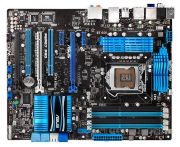
Abbildung ggf. abweichend
Preisalarm
ASUS P8P67 Pro
Hersteller: ASUS
Abbildung ggf. abweichend
Hersteller: ASUS
- Mainboard
- Sockel: 1155
- Speichertyp: DDR3
- Anschlüsse: 15 Pin D-SUB Ausgang, Audio-Ausgang (3,5 mm), Audio-Eingang (3,5 mm), PS/2, S/PDIF koaxial, USB 2.0, USB 3.0, Gigabit Ethernet RJ45 (1000 Mbit)
- Formfaktor: ATX
- Speichertaktung: 1.600 MHz
- LAN-Chip: Intel i82579
- LAN-Geschwindigkeit: 10 Mbit (IEEE 802.3), 100 Mbit (IEEE 802.3u), 1000 Mbit (IEEE 802.3ab)
Hersteller:
ASUS
Tests und Testberichte

Test: Einzeltest: ASUS P8P67 Pro Socket 1155 Motherboard
Zitat: The combination of the new Intel Sandy Bridge and the ASUS P8P67 Pro is a match made in heaven. The technology that comes with the new chipset is definitely a step in the right direction, making the previous P55 a thing of the past. The new micro-architecture blends computing performance and efficiency, but leave it to ASUS to take it to another level. The P8P67 Pro offers several new features that you would be hard press to find in the same price range on a competitor’s motherboard. Many of us feared the end of overclocking when rumors that Intel was locking the Sandy Bridge CPU. Rumors are one thing, reality is another. With the P8P67 Pro we were able to take the Intel Core i5 2500K far beyond that of any P55 processors we have had in the lab. 4842MHz is nothing to sneeze at, especially when all it took to achieve that was a few simple adjustments to the Turbo multiplier and a voltage bump. More tweaking and better cooling definitely would net a better result. An old application, but with new and improvements enhancements, the AI Suite is one of the most complete software applications bundled with a motherboard. From within the application you can enable and disable many of the motherboard features such as EPU and TPU . No longer do you have to rely on multiple different applications to overclock your CPU, monitor sensor readings, or upgrade the BIOS. It is all taken care in the AI Suite. With there being 16 PCIe lanes sporting 5GT/s of bandwidth for graphic cards, the P67 is an ideal solution for those that want to run a higher-end graphics card. Now the P8P67 does support CrossFireX and SLi, but this do mean that the use of dual slots will lower the slots to x8/x8, but this is comparable to x16/x16 on the previous generation P57 chipset since it only had 2.5GT/s bandwidth. Still, it is nice to know the option is there if you want to add more GPU to your gaming rig. The most notable feature to us from the P8P67 Pro was the UEFI BIOS. The new BIOS standard does away with the keyboard only navigated simplistic interface we all are accustomed to. Now you can venture through the BIOS in a much quicker manner using the mouse. The BIOS is far more pleasant to look at as well since the GUI upgrade is ten times better than the previous versions. One of the last features we will talk about in this conclusion is the EPU and TPU features. For those that want more performance the TPU can automatically overclock the system for you in a matter of minutes. On the flip side, if you are one that is worried about the power bill at the end of the month, then the EPU can shut down aspects of the motherboard and processor to for better efficiency. The ASUS P8P67 Pro and all its features will retail for about $190 putting it inside the mid-range price point. {aseadnet|asus p8p67|asus|p8p67 pro}

Test: Einzeltest: ASUS P8P67 PRO Sandy Bridge motherboard
Zitat: Recommended
Pros: + Thoughtful integration of useful features
+ UEFI BIOS is nice
+ Overclocks well with K-series chips
+ Good layout
Cons: - £150 is still a lot of money for a midrange P67 board
ASUS knows all too well that differentiating its Sandy Bridge motherboards from the competitions´ requires careful thought on features and implementation rather than a myopic focus on straight-line speed. The £150 P8P67 PRO crams in an excellent array of features on to a well-laid-out board. There´s practically everything you could want in a deluxe board, topped off by the one of the better BIOSes we´ve seen thus far. Performance is solid at stock speeds and the PRO´s got enough overclocking wherewithal to push K-series chips over 1GHz past their default speeds. Readers looking for even more would do well to take a peek at the £185 Deluxe variant, which ships with a second Gigabit port, rear-mounted clear CMOS button, debug LED, and a heftier array of heatsinks.

Test: Einzeltest: ASUS P8P67 Pro Motherboard
Meinungen
Produktdetails
Audio-Chip: Realtek ALC892
RAID Kompatibilität: RAID 0, RAID 1, RAID 10, RAID 5
Schnittstellen: S-ATA II (300 MB/s), S-ATA III (600 MB/s)
PCI-Schnittstelle: 2x
Beliebte Produkte

ASUS Prime H610M-D D4
ab 74,82€

ASUS ROG Maximus Z890 Extreme
ab 682,12€

ASUS Pro B860M-C-CSM
ab 133,84€

ASUS ROG Strix Z890-E Gaming WiFi
ab 351,75€

ASUS Prime Z790-P WiFi
ab 149,90€

GIGABYTE Z790 D
ab 144,10€

ASRock H610M-HVS
ab 112,00€

ASRock B760M Steel Legend WiFi
ab 137,89€

ASRock H610M-HDV/M.2+ D5
ab 45,89€

GIGABYTE B760 Gaming X DDR4
ab 114,90€
Produktdaten
| RAID Kompatibilität: | RAID 0, RAID 1, RAID 10, RAID 5 |
|---|---|
| Anschlüsse: | 15 Pin D-SUB Ausgang, Audio-Ausgang (3,5 mm), Audio-Eingang (3,5 mm), PS/2, S/PDIF koaxial, USB 2.0, USB 3.0, Gigabit Ethernet RJ45 (1000 Mbit) |
| Schnittstellen: | S-ATA II (300 MB/s), S-ATA III (600 MB/s) |
| PCI-Schnittstelle: | 2x |
| Formfaktor: | ATX |
|---|
| Sockel: | 1155 |
|---|
| Bios-Typ: | AMI |
|---|
| Speichertyp: | DDR3 |
|---|---|
| Speichertaktung: | 1.600 MHz |
| LAN-Chip: | Intel i82579 |
|---|---|
| LAN-Geschwindigkeit: | 10 Mbit (IEEE 802.3), 100 Mbit (IEEE 802.3u), 1000 Mbit (IEEE 802.3ab) |
| Audio-Chip: | Realtek ALC892 |
62 Meinungen**
Neueste
Falsches Motherboard
|
22.05.2019
|
von Trustami
Motherboard war ein anderes als am Bild ,dazu hatte es einen Riss auf der Platine ( USB Anschluss) habe es behalten und ein wenig Nachlass bekommen da das hin und her schicken zuviel Zeit kostet . Normalerweise hätte ich es noch billiger bekommen solln
Asus P8P67 Rev3.0 Mainboard Sockel 1155
|
24.08.2017
|
von Trustami
Das Mainboard ist für meine Ansprüche voll in Ordnung. Preis Leistung gut. Hat jetzt auch schon 6 Jahre auf dem Buckel
ASUS P8P67 rev. 3.0 top !!!!
|
09.02.2015
|
von Trustami
Ich hab mir nach langer seit ein neues mainboard gekauft und das asus P8P67 rev 3.0 war perfekt es hate genau das was ich gebraucht habe genügend ram speicher Plätze genügend sata steck Plätze usb 3.0 und Platz für 2 grafikkarten das mir sehr wichtig war, leider ist es gebraucht aber als es bei mir angekommen ist sah es wirklich wir neu aus. Der Inhalt war komplett und ich entfällt jeden das mainboard weil es einfach top ist und sehr...mehr billig für diesen Preis ;)weniger
Asus halt
|
03.03.2014
|
von Trustami
Das Mainboard läuft nun seit geraumer Zeit in meinem Rechner und hat keinerlei Probleme gemacht. Bei Einsatz eines i5 Prozessoren sollte man allerdings bedenken nur 1333 RAM zu verwenden, da es sonst zu abstürzen kommen kann, was mein anfänglicher Fehler war.
War nicht ganz günstig aber hat sich doch gelohnt
|
09.02.2014
|
von Trustami
Mainboard solte eigendlich auch gleich Mainboard sein. Klar gibt es da die ein oder andern UnterschiedeBei diesem mainbord gefällt mir besonders das Bios- Übersichtliche und zahlreiche Einstellungsmöglichkeiten Komplett in deutsch oder einer andern Wunschsprache.Die beigfügte Software für cpu-Lüftersteuerung etc ist ebenfalls Super, keine Kompromisse mehr mit kostenlose-lüfterprogs!
Sehr empfehlenswert
|
22.03.2013
|
von Trustami
Preis Leistung echt super. Die Qualität, die man von ASUS gewohnt ist. Allerdings muß man beachten welchen Prozessor man dazu nimmt. Der Core i5 3350P funktioniert zwar super, allerdings erst wenn man das aktuelle Bios aufspielt. Also vorher informieren sonst sind Aufwand und Kosten schnell höher als geplant.Nichts desto trotz ein sehr empfehlenswertes Board.
Sehr zufrieden - nach einem BIOS Upgrade
|
10.03.2013
|
von Trustami
Immer wieder ASUS.Nach sehr guter Erfahrung mit dem Kauf des ASUS P8P67 Rev. 3.1 vor 2 Jahren, habe ich mich für den Neubau eines PC's wieder für ein ASUS-Board entschieden.Zu meinem Leidwesen hatte ich vergessen, dass dieses Board natürlich nicht die neueste Generation der intel-Prozessoren kennt.Deshalb passierte beim ersten Start nach Einbau aller Komponenten in mein PC-Gehäuse erst einmal NICHTS.Also, flott eine ältere CPU besorgt,...mehr eingebaut, BIOS-Upgrade gefahren, ältere CPU ausgebaut, neue CPU eiongebaut und ales funktionierte super.Alles läuft wunderbar rund und zuverlässig.weniger
P8P67 Delux
|
28.01.2013
|
von Trustami
jeder der schon einmal ein board von asus hatte weiß ja es läuft.ich bin von einem p5q deluxe auf dieses gewächselt und ich muss sagen da liegen welten zwischen.das bios ist eine augenweide kinderleicht zu bedienen eine super oberfläche und fast alles selbsterklärend.und was auch ein punkt ist die boards sind absolut robust will nicht sagen ich habe alles probiert aber alle parameter die als max bekannt wahren würden gut ünerschritten ohne...mehr irgendwelche folgen.(langzeittest)bitte nicht falsch verstehen alles ist entlich aber preis leistung sind absolut gutfazit:kaufenweniger
absolute Katastrophe
|
21.01.2013
|
von Trustami
vielleicht habe ich eine Montagsproduktion erwischt - jedenfalls bin ich als (gewesener)ASUS-Fan mehr als enttäuscht. Schon beim ersten booten lief das Board nur sehr zögerlich an, später stellte sich heraus, dass das schon der erste Fehler war. Nachdem der Rechner aufgebaut war - ich mach es jetzt kurz - hat sich das BIOS des Boards selbst abgeschossen, begleitet mit dem Fehlercode 6. Anscheinend ist das das grosse Problem dieses Boards, in...mehr den Foren wird ständig über diesen Fehler berichtet. Ich habe das Board zurückgeschickt, die Rückabwicklung war gewohnt super. Bin jetzt zu Gigabyte gewechselt und wie es aussieht war das kein schlechter Wechsel.weniger
Eigentlich ein schönes Mainboard
|
30.12.2012
|
von Trustami
Als ich es auspackte sah alles sehr gut aus auch die Verarbeitung war sehr gut. Also hab ich es zusammen mit meinem neu gekauften i5 3570k und den G.Skill Arbeitsspeichern eingebaut doch als ich ihn anschalten wollte kan nur ein schwarzer Bildschirm und die CPU-Led auf dem Board leuchtete. Also alles nochmal ausgebaut und CPU wieder neu eingesetz und geschaut ob alles gut sitzt. Doch leider kam wieder nichts außer einem schwarzen Bildschirm....mehr Nach erinigen Recherchen fand ich dann heraus, dass das aktuelle Bios nicht mit Ivy kompatibel ist und man es zuerst noch updaten müsste. Da ich jedoch keinen anderen Prozessor habe mit dem es laufen würde musste ich es leider wieder zurückschicken und ein anderes bestellen.FAZITIm großen und ganzen ein schönes Mainboard, hat auch ausreichend viele Steckplätze und Anschlüsse doch falls man sich eine CPU der Ivy Serie kaufen möchte und keinen anderen Prozessor mit einem 1155 Sockel besitzt FINGER WEG von diesem Board.weniger
Zurück
Weiter
ASUS P8P67 Pro Gesamte Bewertungen
3.8out of 5
Basierend auf 62 Nutzer-Meinungen
Teile uns deine Meinung zum Produkt mit!
Tests und Testberichte ASUS P8P67 Pro
pro-clockers.com
Ausgabe 8/2011
Test: Einzeltest: ASUS P8P67 Pro Socket 1155 Motherboard
Zitat: "The combination of the new Intel Sandy Bridge and the ASUS P8P67 Pro is a match made in heaven. The technology that comes with the new chipset is definitely a step in the right direction, making the previous..."
hexus.net
Ausgabe 4/2011
Test: Einzeltest: ASUS P8P67 PRO Sandy Bridge motherboard
Zitat: "Recommended
Pros: + Thoughtful integration of useful features
+ UEFI BIOS is nice
+ Overclocks well with K-series chips
+ Good layout
Cons: - £150 is still a lot of money for a midrange P67 board
..."
motherboards.org
Ausgabe 1/2011
Test: Einzeltest: ASUS P8P67 Pro Motherboard
Beliebte Kaufberatungen
- Beliebte B660-Mainboards im Vergleich: So ist der PC auf einer guter Basis07.08.2023

- Beliebte Mainboards mit B760-Sockel im Vergleich25.07.2023
- Beliebte Mainboards für Intel-1200-Sockel im Vergleich24.02.2023
- Beliebte Mainboards für Intel Sockel 1700 im Vergleich23.02.2023
- Beliebt und richtig schnell: X670E-Mainboards im Vergleich – das "E" steht für Extreme13.08.2024

- Mainboard-Kaufberatung für AM5 Sockel: Die beliebtesten Motherboards im Vergleich14.12.2023
- Beliebte Mainboards mit B650E-Sockel im Vergleich25.07.2023
- Preis-Leistungs-Tipp: A620-Mainboards im Vergleich24.07.2023
- Beliebte AMD-Mainboards mit AM4-Sockel im Vergleich16.02.2023
- AMD Mainboards im Vergleich: Die beliebtesten Modelle für jeden PC13.05.2022
Beliebte Produkte


* Die Preise und Versandkosten können sich seit der letzten Aktualisierung beim jeweiligen Händler verändert haben. Alle Preise sind Angaben des jeweiligen Anbieters inklusive Umsatzsteuer, zzgl. Versand - alle Angaben ohne Gewähr. Unser Angebot umfasst nur Anbieter, die für Ihre Weiterleitung an den Shop eine Klick-Provision an uns zahlen.
** Es ist uns nicht möglich zu prüfen, ob die veröffentlichten Bewertungen von Verbrauchern stammen, die die Produkte tatsächlich verwendet oder erworben haben.
** Es ist uns nicht möglich zu prüfen, ob die veröffentlichten Bewertungen von Verbrauchern stammen, die die Produkte tatsächlich verwendet oder erworben haben.
* Die Preise und Versandkosten können sich seit der letzten Aktualisierung beim jeweiligen Händler verändert haben. Alle Preise sind Angaben des jeweiligen Anbieters inklusive Umsatzsteuer, zzgl. Versand - alle Angaben ohne Gewähr. Unser Angebot umfasst nur Anbieter, die für Ihre Weiterleitung an den Shop eine Klick-Provision an uns zahlen.
** Es ist uns nicht möglich zu prüfen, ob die veröffentlichten Bewertungen von Verbrauchern stammen, die die Produkte tatsächlich verwendet oder erworben haben.
** Es ist uns nicht möglich zu prüfen, ob die veröffentlichten Bewertungen von Verbrauchern stammen, die die Produkte tatsächlich verwendet oder erworben haben.


©1999- 2026 by guenstiger.de
Zu teuer?
Jetzt Preisalarm setzen!
Jetzt Preisalarm setzen!
Preisalarm
ASUS P8P67 Pro bewerten

Das hat leider nicht funktioniert!
Die Seite konnte nicht aufgerufen werden, bitte versuchen Sie es später nochmal.

Formular schließen?
