Für dieses Produkt haben wir gegenwärtig keine Händlerangebote in der Datenbank.
in allen Kategorien
in Computer
in Telekommunikation
in Hifi | Audio
in TV | Video | Foto
in Haushalt
in Freizeit
in Mode & Accessoires
in Haus & Garten
in Beauty & Gesundheit
in Auto & Motorrad
- ComputerArbeitsspeicherBauteileCPUDruckerDruckerzubehörEingabegerätFestplatteGrafikkarteKomplettsystemLaufwerkMainboardMonitorMultimediaNetzwerkNotebookNotebookzubehörPC-SpielScannerSoftwareSpeichermediumSpielekonsoleTablet & E-Book-ReaderTaschenrechnerComputer und Zubehör verschiedenster Anbieter findenJetzt shoppen

- TelekommunikationFaxgerätFunkgerätHandyHandyzubehörTelefon (Analog)Telefon (ISDN)Telefon (VoIP)TelefonanlageTelefone, Smartphones und Co. verschiedenster Anbieter findenJetzt shoppen

- Hifi | AudioAudio-KompaktanlageDJ EquipmentHifi-BausteinInstrumentenzubehörKopfhörerLautsprecherMusikinstrumentPortable AudioplayerRadioHiFi- und Audiogeräte verschiedenster Anbieter findenJetzt shoppen
- TV | Video | FotoBeamer + ZubehörBlu-ray-/DVD-GerätCamcorderFernseherFoto-/CamcorderzubehörFotokameraHome Cinema SystemObjektivOptikTV-ReceiverTV-ZubehörTV/Sat-AntenneTV-, Video- und Fotoapparate verschiedenster Anbieter findenJetzt shoppen

- HaushaltBaby-HomeBaby-MobilBack- & GrillgerätBügeleisenDunstabzugshaubeGefrierschrankGeschirrGeschirrspülerHeiz- & KlimagerätHerdKaffeemaschineKüchenhelferKühlschrankMikrowelleNähmaschinePersonenwaageReinigungsgerätStaubsaugerWaschmaschineWäschetrocknerHaushaltsgeräte verschiedenster Anbieter findenJetzt shoppen

- FreizeitBuchCamping + OutdoorFahrradFilme & SerienFitnessgerätModellbauSpiele + PuzzleSpielwarenSportSportschuheWintersportFreizeitartikel verschiedenster Anbieter findenJetzt shoppen

- Mode & AccessoiresMode DamenMode HerrenMode KinderMode-AccessoiresSchmuckSchuheTasche + KofferUhrKleidung, Schuhe & Accessoires verschiedenster Anbieter findenJetzt shoppen

- Haus & GartenBaumarktBürobedarfGartenHeimwerkerMöbelSonstigesTierbedarfWeihnachtenGarten- und Heimwerkerartikel verschiedenster Anbieter findenJetzt shoppen

- Beauty & GesundheitArzneimittelElektrische ZahnbürsteElektrorasiererGesundheitsproduktHaarstylerKontaktlinsenKosmetikWellnessGesundheitsprodukte und Kosmetik verschiedenster Anbieter findenJetzt shoppen

- Auto & MotorradAutoreifen + FelgeAutozubehörCar HifiMotorradNavigationssystemAuto- und Motorradzubehör verschiedenster Anbieter findenJetzt shoppen

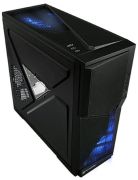
Abbildung ggf. abweichend
ThermalTake Armor A90 (VL90001W2Z)
Hersteller: Thermaltake
Abbildung ggf. abweichend
Hersteller: ThermaltakePreisalarm
- Gehäuse
- Formfaktor: ATX, MicroATX
- Laufwerkseinschübe: 1x extern 3,5 Zoll, 3x extern 5,25 Zoll, 1x intern 2,5 Zoll, 6x intern 3,5 Zoll
- USB 2.0-Anschlüsse: 4x
- Anschlüsse: 3,5 mm-Klinkenanschluss, eSATA, Mikrofon
- Anzahl der Lüfter: 3
- Sichtfenster: Ja
- Display vorhanden: Nein
Hersteller:
Thermaltake
Tests und Testberichte

Test: 25 Gehäuse für jeden Geschmack
Zitat: + Niedrige Lautstärke in 2D
+ 2 x Schlauchdurchführung
+ Ungewöhnliches Design

Test: Einzeltest: Thermaltake Armor A90 case
Zitat: For: + Ultra-cool airflow
+ Solidly built
+ Enjoyably silly appearance
Against: - Not for the fat-handed

Test: Einzeltest: Thermaltake Armor A90 Steel Midtower Gaming Case
Zitat: As I mentioned in the beginning, I knew I would spend some time comparing the Armor A90 to Thermaltake´s V9 mid tower. In my humble opinion, as far as for function, Thermaltake has improved upon all of the little things that I eventually found I didn´t care for about my V9, which has been in daily usage for over a year, and placed them in the Armor A90. Rather than place the power supply directly on the floor of the case, it is raised about ½” above the floor to allow ventilation if you forget to clean the filter or if you place the case on a carpeted floor. Rather than the V9´s 120mm fiber filter, the A90 has a much larger modder´s mesh filter area. The hard drive bay faces the rear of the case rather than the sides, allowing easier installation of a full sized video card. It is very difficult to install a large video card with power connectors on the end of the card into a mid tower with a side facing hard drive bay without some modding. The blowhole fan is well protected in the A90, the modder´s mesh covering the V9´s blowhole is a little fragile and though you shouldn´t place stuff on the top of your rig, it happens, and the mesh can bend and interfere with the fan. Finally, though the V9´s tool free devices are just fine, I really like the new tool free devices on the A90, and the fact that they remain connected to the chassis rather than having to be removed to install a drive. I suppose that a case´s aesthetics are a personal thing, the Armor A90 should suit most people looking for a nice mid tower. The futuristic design is neither gaudy nor childish, interesting enough to be carried to a LAN, but still nice sitting at all but the most conservative enthusiast´s workstation. The matte black powder coat both inside and out is another personal preference, I personally like black cases and really like the black interior of the Armor A90. Of course, this is a Thermaltake case, so there is plenty of ventilation here. There is an option of three intake fan configurations (a 120mm blue LED fan is included); an included 200mm blowhole fan, an optional 120mm side panel fan blowing in the video card area and with the typical 120mm rear exhaust fan. The front of the case is totally open, no punched holes here, and the side venting consists of very large honeycomb. I´ve already mentioned the blowhole and power supply provisions. As for cable management, the Armor A90 may have the best cable management I´ve seen on a mid tower. Cable management is rather difficult on a case with the PSU mounted on the floor, but the A90 makes it about as painless as possible. There is ample stowage area behind the HDD bay for all cables. There are also some openings punched into the forward part of the motherboard tray to connect wire ties or zip ties to keep the visible cables tidy. Another very nice feature of this case is the external ports. Nearly all cases have them either on the front or the top of the case. The Armor A90 has a pair of USB ports on the front of the case, and another pair, along with an eSATA port on top of the case, making ports convenient whether the case is below the workstation or on the desktop. This adds flexibility both at your workstation and at a LAN party. I found nothing not to like about the Thermaltake Armor A90. But I should mention that it is taller than the typical mid tower, about 2 ½” taller, so if your designated space for your rig is a tight fit for a normal mid tower, the A90 may not fit in that space. Also, the intake fan and blowhole fan are both LED fans and can be easily seen while the rig is running. Neither is overly bright. Additionally, the opening in the motherboard provided for ease in installing/removing CPU cooler back plates will not work for all motherboard configurations. None of these is important enough to be a "con" but all worth noting. The Thermaltake Armor A90 sells for $90 at my favorite online retailer, definitely a good deal for...

Test: Einzeltest: Thermaltake Armor A90
Zitat: Good Things: + Excellent black finish on the entire case
+ Window for CPU cooler changes
+ Some pre-sleeved wiring
+ Cohesive Design
+ Removable fan filters
+ Unique design
+ Angular power button
Bad Things: - Thin case material may allow vibrations to resonate
- Door can only open one way, fine unless you have the case on your right side
- No fan controller
- No cable hiding solutions
- Window is a little small
We really liked the attention to detail on the A90, and the many options for fan configurations. The finish on the case is excellent both inside and out. Made from SECC steel the side panels feel slightly flimsy but the stamped areas do stiffen it up nicely to help limit vibrations. Features such as the keyboard and mouse cord lock and water cooling knock outs are easily missed at first glance but add to the overall allure of the case. The exterior styling is unusual and that is what also sets it apart from the competition. Large geometric shapes and varying levels add a lot of distinction and depth to the design. The design elements are also carried thru the chassis to complete the overall package and bring everything together nicely. When you build a new rig you want people to notice it and this case will certainly get noticed. The blue lighting used in the front and top fan also adds a subtle custom look and help accentuate the side panel window. Noticeably absent are any sound deadening accessories and internal cable routing channels. These are both rather surprising given the long list of features already included.

Test: Einzeltest: Thermaltake ARMOR A90
Beliebte Produkte

Thermaltake Core W200
ab 500,90€

Thermaltake TR100
ab 97,50€

Thermaltake View 380 XL TG ARGB
ab 100,39€

Thermaltake The Tower 600
ab 137,36€

Thermaltake S100 TG
ab 75,86€

Fractal Design Terra
ab 167,99€

Mars Gaming MC-CYLON
ab 140,77€

Mars Gaming MCORB Circular Tower
ab 119,90€

Mars Gaming MC-3TCORELCD
ab 109,90€

Deepcool CH260 Wood
ab 68,04€
Produktdaten
| Display vorhanden: | Nein |
|---|
| Maße: | B210 mm x T502 mm x H515 mm |
|---|---|
| Gewicht: | 8,20 kg |
| Formfaktor: | ATX, MicroATX |
|---|---|
| Laufwerkseinschübe: | 1x extern 3,5 Zoll, 3x extern 5,25 Zoll, 1x intern 2,5 Zoll, 6x intern 3,5 Zoll |
| USB 2.0-Anschlüsse: | 4x |
| Anschlüsse: | 3,5 mm-Klinkenanschluss, eSATA, Mikrofon |
| Anzahl der Lüfter: | 3 |
| Sichtfenster: | Ja |
ThermalTake Armor A90 (VL90001W2Z) Bewertungen

Sei der Erste, der dieses Produkt bewertet! Deine Erfahrung kann anderen Nutzern bei ihrer
Tests und Testberichte ThermalTake Armor A90 (VL90001W2Z)
PC games Hardware
Ausgabe 10/2010
Test: 25 Gehäuse für jeden Geschmack
Zitat: "+ Niedrige Lautstärke in 2D
+ 2 x Schlauchdurchführung
+ Ungewöhnliches Design"
techradar.com
Ausgabe 7/2010
Test: Einzeltest: Thermaltake Armor A90 case
Zitat: "For: + Ultra-cool airflow
+ Solidly built
+ Enjoyably silly appearance
Against: - Not for the fat-handed
"
ocia.net
Ausgabe 6/2010
Test: Einzeltest: Thermaltake Armor A90 Steel Midtower Gaming Case
Zitat: "As I mentioned in the beginning, I knew I would spend some time comparing the Armor A90 to Thermaltake´s V9 mid tower. In my humble opinion, as far as for function, Thermaltake has improved upon all of the l..."
ninjalane.com
Ausgabe 6/2010
Test: Einzeltest: Thermaltake Armor A90
Zitat: "Good Things: + Excellent black finish on the entire case
+ Window for CPU cooler changes
+ Some pre-sleeved wiring
+ Cohesive Design
+ Removable fan filters
+ Unique design
+ Angular power button
..."
motherboards.org
Ausgabe 6/2010
Test: Einzeltest: Thermaltake ARMOR A90
motherboards.org
Ausgabe 6/2010
Test: Einzeltest: Thermaltake ARMOR A90 Case
Zitat: "The Armor A90 case from Thermaltake retails for under $100. For that price you get some advanced features including water-cooling compatible holes, bottom mounted PSU, tool-less drive installation and more. ..."

Tweaktown
Ausgabe 6/2010
Test: Einzeltest: Thermaltake Armor A90 Mid Tower Chassis
Zitat: "To tell you the truth, I am not much into medieval things, dragons, or even getting off my lazy butt to go to a LAN. IF you are into all of these things, you are in luck, as Thermaltake offers a way for you ..."

legitreviews.com
Ausgabe 6/2010
Test: Einzeltest: VL90001W2Z
Zitat: "The Thermaltake Armor A90 is a very large, cool looking mid-tower chassis with all the features anyone could ask for, and for an amazing street price of $89.99 the choice to purchase is down to personal pref..."

overclockersclub.com
Ausgabe 5/2010
Test: Einzeltest: Thermaltake Armor A90
Zitat: "Pros: + Looks great
+ Performs well in multiple categories with no additional fans
+ Paint finish is very durable
Cons: - GPU Temps
I like the way this case looks, feels, and performs. There is..."

pro-clockers.com
Ausgabe 5/2010
Test: Einzeltest: Thermaltake Armor A90 Tower
Zitat: "Is the new Armor A90 anything like the original Armor? Not at all. Is that a good thing or bad? We will leave that up to the individual that is looking for a new case for their next rig. But what we can tell you is the new Armor A90 is a good looking case that has the ability to appeal to the professional as well as the gamer..."
Beliebte Kaufberatungen
- Beliebte Desktop-PC-Gehäuse im Vergleich21.03.2023

- Beliebte Mini-Tower PC-Gehäuse im Vergleich20.03.2023

- Beliebte Big Tower PC-Gehäuse im Vergleich14.03.2023
- Beliebte PC-Gehäuse für Midi-Tower im Vergleich28.02.2023
- Beliebte PC-Gehäuse für ITX- und DTX-Mainboards im Vergleich28.02.2023
- Beliebte externe Gehäuse für M.2-SSDs im Vergleich20.01.2025
- Beliebte ATX-Netzteile mit 750 Watt im Vergleich29.10.2024
- Beliebte Gehäuselüfter mit RGB im Vergleich03.07.2023
- Beliebte Gehäuselüfter mit 140 mm Durchmesser im Vergleich01.07.2023
- Beliebte Gehäuselüfter mit 120 mm Durchmesser im Vergleich01.07.2023
Beliebte Produkte

* Die Preise und Versandkosten können sich seit der letzten Aktualisierung beim jeweiligen Händler verändert haben. Alle Preise sind Angaben des jeweiligen Anbieters inklusive Umsatzsteuer, zzgl. Versand - alle Angaben ohne Gewähr. Unser Angebot umfasst nur Anbieter, die für Ihre Weiterleitung an den Shop eine Klick-Provision an uns zahlen.
* Die Preise und Versandkosten können sich seit der letzten Aktualisierung beim jeweiligen Händler verändert haben. Alle Preise sind Angaben des jeweiligen Anbieters inklusive Umsatzsteuer, zzgl. Versand - alle Angaben ohne Gewähr. Unser Angebot umfasst nur Anbieter, die für Ihre Weiterleitung an den Shop eine Klick-Provision an uns zahlen.


©1999- 2026 by guenstiger.de
Zu teuer?
Jetzt Preisalarm setzen!
Jetzt Preisalarm setzen!
Preisalarm
ThermalTake Armor A90 (VL90001W2Z) bewerten

Das hat leider nicht funktioniert!
Die Seite konnte nicht aufgerufen werden, bitte versuchen Sie es später nochmal.

Formular schließen?
