Für dieses Produkt haben wir gegenwärtig keine Händlerangebote in der Datenbank.
in allen Kategorien
in Computer
in Telekommunikation
in Hifi | Audio
in TV | Video | Foto
in Haushalt
in Freizeit
in Mode & Accessoires
in Haus & Garten
in Beauty & Gesundheit
in Auto & Motorrad
- ComputerArbeitsspeicherBauteileCPUDruckerDruckerzubehörEingabegerätFestplatteGrafikkarteKomplettsystemLaufwerkMainboardMonitorMultimediaNetzwerkNotebookNotebookzubehörPC-SpielScannerSoftwareSpeichermediumSpielekonsoleTablet & E-Book-ReaderTaschenrechnerComputer und Zubehör verschiedenster Anbieter findenJetzt shoppen
- TelekommunikationFaxgerätFunkgerätHandyHandyzubehörTelefon (Analog)Telefon (ISDN)Telefon (VoIP)TelefonanlageTelefone, Smartphones und Co. verschiedenster Anbieter findenJetzt shoppen
- Hifi | AudioAudio-KompaktanlageDJ EquipmentHifi-BausteinInstrumentenzubehörKopfhörerLautsprecherMusikinstrumentPortable AudioplayerRadioHiFi- und Audiogeräte verschiedenster Anbieter findenJetzt shoppen
- TV | Video | FotoBeamer + ZubehörBlu-ray-/DVD-GerätCamcorderFernseherFoto-/CamcorderzubehörFotokameraHome Cinema SystemObjektivOptikTV-ReceiverTV-ZubehörTV/Sat-AntenneTV-, Video- und Fotoapparate verschiedenster Anbieter findenJetzt shoppen
- HaushaltBaby-HomeBaby-MobilBack- & GrillgerätBügeleisenDunstabzugshaubeGefrierschrankGeschirrGeschirrspülerHeiz- & KlimagerätHerdKaffeemaschineKüchenhelferKühlschrankMikrowelleNähmaschinePersonenwaageReinigungsgerätStaubsaugerWaschmaschineWäschetrocknerHaushaltsgeräte verschiedenster Anbieter findenJetzt shoppen
- FreizeitBuchCamping + OutdoorFahrradFilme & SerienFitnessgerätModellbauSpiele + PuzzleSpielwarenSportSportschuheWintersportFreizeitartikel verschiedenster Anbieter findenJetzt shoppen

- Mode & AccessoiresMode DamenMode HerrenMode KinderMode-AccessoiresSchmuckSchuheTasche + KofferUhrKleidung, Schuhe & Accessoires verschiedenster Anbieter findenJetzt shoppen

- Haus & GartenBaumarktBürobedarfGartenHeimwerkerMöbelSonstigesTierbedarfWeihnachtenGarten- und Heimwerkerartikel verschiedenster Anbieter findenJetzt shoppen

- Beauty & GesundheitArzneimittelElektrische ZahnbürsteElektrorasiererGesundheitsproduktHaarstylerKontaktlinsenKosmetikWellnessGesundheitsprodukte und Kosmetik verschiedenster Anbieter findenJetzt shoppen
- Auto & MotorradAutoreifen + FelgeAutozubehörCar HifiMotorradNavigationssystemAuto- und Motorradzubehör verschiedenster Anbieter findenJetzt shoppen
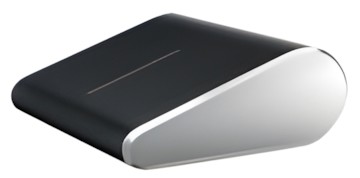
Abbildung ggf. abweichend
Preisalarm
Microsoft Wedge Touch Mouse
Hersteller: Microsoft
Abbildung ggf. abweichend
Hersteller: Microsoft
- Maus
- Mausart: BlueTrack
- Schnurlos: Ja
- Mausanschluss: Bluetooth
- Linkshänder-geeignet: Ja
Hersteller:
Microsoft
Tests und Testberichte

Test: Mirosoft Wedge Mouse und Keyboard
Zitat: Getestet mit: Microsoft Wedge Touch Keyboard
Die beiden Tablet-Eingabegeräte von Microsoft gefallen durch einige raffinierte Details, erfordern aber auch Eingewöhnungszeit. Zudem lässt sich Microsoft das schicke Design auch gut bezahlen.

Test: Einzeltest: Microsoft Wedge Touch Mouse
Zitat: It´s not cheap, or big. And on first site the Microsoft Wedge Touch Mouse looks as though it wouldn´t be comfortable for long-term use. But like Windows 8 itself, we found it surprisingly comfortable and efficient to use. It´s well built, and stylish. And it is the best way to mouse around Windows 8. You´ll need a Bluetooth-enabled device to use the Wedge Touch Mouse.

Test: Einzeltest: Microsoft Wedge Touch mouse
Zitat: The Good: + Small
+ light
+ stylish
+ comfortable to use
The Bad: - Right click can be bothersome
- expensive
We love the Wedge Touch mouse, it´s small but perfectly formed and it works as a full-sized mouse would, but in a tiny package. It´s comfortable enough to use for extended periods too, making it ideal for travel.

Test: Einzeltest: Microsoft Wedge Touch Mouse
Zitat: The good: + If you really need a mouse on the go, you won’t find many smaller than the striking Microsoft Wedge Touch Mouse. With a surface area barely bigger than a credit card, it’s certainly easy to throw in your bag. It’s surprisingly comfortable to use too considering its wee size. The top surface recognises swipes in four directions, so you can scroll around on pages and in applications with ease. Handily, it connects by Bluetooth, so it’s completely cordless, and you don’t need a USB receiver. We know, we know: Bluetooth gadgets drain juice like Sunny Delight executives at a board meeting, especially when you forget to turn them off. Usually. But the Microsoft Wedge Touch Mouse has a smart shut down mode, deactivating itself when it senses the device it’s attached to is off or on sleep mode - so you won’t run out of AA batteries very quickly.
The bad: - Windows 8 is just around the corner, and with it come all sorts of new gestures, including the ability to swipe between apps. But you won’t be able to pull them off with the Microsoft Wedge Touch Mouse That’s a bit silly, especially when Apple’s Magic Mouse and Trackpad support all sorts of useful gestures on Macs. You can’t pinch to zoom in, switch app or pull up Microsoft’s Windows 8 Charm bar (a bit like the Start menu in previous versions of Windows). It’s a pity, especially when you consider the cost. At around £65 in stores, it’s not a cheap accessory. That’s the sort of price that’ll make your laptop’s trackpad seem a lot more tempting. And really, if you’re using this with a tablet on a regular basis, you’ll be carrying around more gear with you than if you just used a netbook PC, Ultrabook laptop or MacBook Air.
Microsoft´s Wedge Touch mouse is a novel idea and for those who need to get work done regularly on the go (we´re thinking cross country train journeys rather than short bus rides) and it’s ideal for all those Windows 8 devices just around the corner. But the very fact that it´s yet another device to buy and lug around with you counts against it when ultra thin laptops with ultra impressive trackpads built are now the norm. For most, this won’t be the portable solution Microsoft dreamed of.
Beliebte Produkte

Microsoft Bluetooth Mouse
ab 19,77€

Microsoft Wireless Mobile Mouse 3500
ab 23,62€

Microsoft Surface Mouse
ab 47,47€

Microsoft Surface Arc Mouse
ab 50,96€

Microsoft Wireless Mobile Mouse 1850
ab 28,89€

Logitech MX Master 4
ab 100,00€

Logitech Wireless Mouse M705
ab 21,99€

Apple Magic Mouse
ab 69,00€

Logitech Ergo M575
ab 32,90€

Logitech G502 LIGHTSPEED
ab 95,99€
Produktdaten
| Schnurlos: | Ja |
|---|---|
| Mausart: | BlueTrack |
| Mausanschluss: | Bluetooth |
| Linkshänder-geeignet: | Ja |
Microsoft Wedge Touch Mouse Bewertungen

Sei der Erste, der dieses Produkt bewertet! Deine Erfahrung kann anderen Nutzern bei ihrer
Tests und Testberichte Microsoft Wedge Touch Mouse
PC Magazin
Ausgabe 10/2012
Test: Mirosoft Wedge Mouse und Keyboard
Zitat: "Getestet mit: Microsoft Wedge Touch Keyboard
Die beiden Tablet-Eingabegeräte von Microsoft gefallen durch einige raffinierte Details, erfordern aber auch Eingewöhnungszeit. Zudem lässt sich Microsoft das ..."
pcadvisor.co.uk
Ausgabe 9/2012
Test: Einzeltest: Microsoft Wedge Touch Mouse
Zitat: "It´s not cheap, or big. And on first site the Microsoft Wedge Touch Mouse looks as though it wouldn´t be comfortable for long-term use. But like Windows 8 itself, we found it surprisingly comfortable and eff..."
pocket-lint.co.uk
Ausgabe 8/2012
Test: Einzeltest: Microsoft Wedge Touch mouse
Zitat: "The Good: + Small
+ light
+ stylish
+ comfortable to use
The Bad: - Right click can be bothersome
- expensive
We love the Wedge Touch mouse, it´s small but perfectly formed and it works as a full-siz..."
The Gadget Show
Ausgabe 8/2012
Test: Einzeltest: Microsoft Wedge Touch Mouse
Zitat: "The good: + If you really need a mouse on the go, you won’t find many smaller than the striking Microsoft Wedge Touch Mouse. With a surface area barely bigger than a credit card, it’s certainly easy to throw..."
Beliebte Kaufberatungen
- Zocken bis der Arzt kommt: Die besten drahtlosen Mäuse für Gamer28.01.2022

- Drahtlos und schnell: Die besten Wireless-Mäuse für jeden Einsatzzweck28.01.2022
- Kampf dem Mausarm: ergonomische Computermäuse im Check11.01.2022
- Mäuse für Linkshänder: Die besten Computermäuse im Vergleich01.01.2022
- Presenter für die perfekte PowerPoint-Präsentation16.09.2021
- Tastaturen bis 50 Euro im Vergleich – vielseitige Modelle für Arbeit und Freizeit24.11.2025

- High-End-Tastaturen für Profis und Gamer im Vergleich07.03.2023
- Beliebte schnurlose Tastaturen ab 30 Euro im Vergleich13.02.2023
- Beliebte Tastaturen zwischen 100 und 150 Euro im Vergleich08.02.2023
- Beliebte Tastaturen zwischen 50 und 100 Euro im Vergleich07.02.2023
Beliebte Produkte

* Die Preise und Versandkosten können sich seit der letzten Aktualisierung beim jeweiligen Händler verändert haben. Alle Preise sind Angaben des jeweiligen Anbieters inklusive Umsatzsteuer, zzgl. Versand - alle Angaben ohne Gewähr. Unser Angebot umfasst nur Anbieter, die für Ihre Weiterleitung an den Shop eine Klick-Provision an uns zahlen.
* Die Preise und Versandkosten können sich seit der letzten Aktualisierung beim jeweiligen Händler verändert haben. Alle Preise sind Angaben des jeweiligen Anbieters inklusive Umsatzsteuer, zzgl. Versand - alle Angaben ohne Gewähr. Unser Angebot umfasst nur Anbieter, die für Ihre Weiterleitung an den Shop eine Klick-Provision an uns zahlen.


©1999- 2026 by guenstiger.de
Zu teuer?
Jetzt Preisalarm setzen!
Jetzt Preisalarm setzen!
Preisalarm
Microsoft Wedge Touch Mouse bewerten

Das hat leider nicht funktioniert!
Die Seite konnte nicht aufgerufen werden, bitte versuchen Sie es später nochmal.

Formular schließen?
