

Für dieses Produkt haben wir gegenwärtig keine Händlerangebote in der Datenbank.
in allen Kategorien
in Computer
in Telekommunikation
in Hifi | Audio
in TV | Video | Foto
in Haushalt
in Freizeit
in Mode & Accessoires
in Haus & Garten
in Beauty & Gesundheit
in Auto & Motorrad
- ComputerArbeitsspeicherBauteileCPUDruckerDruckerzubehörEingabegerätFestplatteGrafikkarteKomplettsystemLaufwerkMainboardMonitorMultimediaNetzwerkNotebookNotebookzubehörPC-SpielScannerSoftwareSpeichermediumSpielekonsoleTablet & E-Book-ReaderTaschenrechnerComputer und Zubehör verschiedenster Anbieter findenJetzt shoppen

- TelekommunikationFaxgerätFunkgerätHandyHandyzubehörTelefon (Analog)Telefon (ISDN)Telefon (VoIP)TelefonanlageTelefone, Smartphones und Co. verschiedenster Anbieter findenJetzt shoppen

- Hifi | AudioAudio-KompaktanlageDJ EquipmentHifi-BausteinInstrumentenzubehörKopfhörerLautsprecherMusikinstrumentPortable AudioplayerRadioHiFi- und Audiogeräte verschiedenster Anbieter findenJetzt shoppen
- TV | Video | FotoBeamer + ZubehörBlu-ray-/DVD-GerätCamcorderFernseherFoto-/CamcorderzubehörFotokameraHome Cinema SystemObjektivOptikTV-ReceiverTV-ZubehörTV/Sat-AntenneTV-, Video- und Fotoapparate verschiedenster Anbieter findenJetzt shoppen
- HaushaltBaby-HomeBaby-MobilBack- & GrillgerätBügeleisenDunstabzugshaubeGefrierschrankGeschirrGeschirrspülerHeiz- & KlimagerätHerdKaffeemaschineKüchenhelferKühlschrankMikrowelleNähmaschinePersonenwaageReinigungsgerätStaubsaugerWaschmaschineWäschetrocknerHaushaltsgeräte verschiedenster Anbieter findenJetzt shoppen
- FreizeitBuchCamping + OutdoorFahrradFilme & SerienFitnessgerätModellbauSpiele + PuzzleSpielwarenSportSportschuheWintersportFreizeitartikel verschiedenster Anbieter findenJetzt shoppen

- Mode & AccessoiresMode DamenMode HerrenMode KinderMode-AccessoiresSchmuckSchuheTasche + KofferUhrKleidung, Schuhe & Accessoires verschiedenster Anbieter findenJetzt shoppen
- Haus & GartenBaumarktBürobedarfGartenHeimwerkerMöbelSonstigesTierbedarfWeihnachtenGarten- und Heimwerkerartikel verschiedenster Anbieter findenJetzt shoppen

- Beauty & GesundheitArzneimittelElektrische ZahnbürsteElektrorasiererGesundheitsproduktHaarstylerKontaktlinsenKosmetikWellnessGesundheitsprodukte und Kosmetik verschiedenster Anbieter findenJetzt shoppen
- Auto & MotorradAutoreifen + FelgeAutozubehörCar HifiMotorradNavigationssystemAuto- und Motorradzubehör verschiedenster Anbieter findenJetzt shoppen
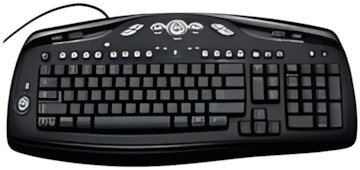
Abbildung ggf. abweichend
Preisalarm
Razer Arctosa
Hersteller: Razer
Abbildung ggf. abweichend
Hersteller: Razer
- Tastatur
- Tastaturanschluss: USB
- Anzahl der Tasten: 104
- Neigung verstellbar: Ja
- Handballenauflage: Ja
- Maße: B470 mm x H20 mm x T165 mm
Hersteller:
Razer
Tests und Testberichte

Test: Einzeltest: Razer Arctosa Gamer Keyboard/
Zitat: Pros: + angenehmer Anschlag
+ Touchpanel mit Media-Tasten
+ Makrofunktion
+ Anti-Ghosting-Feature
+ Windows-Taste lässt sich deaktivieren
+ Handballauflage
+ USB Port
+ coole Optik
+ fairer Preis
Cons: - Tasten klappern
- keine separaten Makrotasten
- keine Hintergrundbeleuchtung
Für vergleichsweise wenig Geld bietet die Razer Arctosa eine ordentliche Ausstattung gepaart mit einem tollen Anschlag. Trotz dieser positiven Kritik bleibt die Tastsache, dass sehr anspruchsvolle Zocker einige Funktionalitäten vermissen werden. Zum Beispiel eine Tasten-Hintergrundbeleuchtung oder separate Makrotasten. Wer auf diese fehlenden Features verzichten kann, der ist beim Razer Keyboard bestens aufgehoben und spart obendrein ziemlich viel Kohle. Christoph meint: Preiswerte und funktionale Gaming-Tastatur!

Test: Einzeltest: Razer Arctosa & Abyssus - ein gutes Team?
Zitat: Beide Produkte haben unseren Testparcours überlebt - doch beide bekommen auch ein gänzlich unterschiedliches Urteil. Wie dieses ausfällt, werden wir nun preisgeben. Die Arctosa können wir leider nicht uneingeschränkt empfehlen - zwar hat sie ihre guten Seiten, die dann aber durch die negativen Pendants getrübt werden. Ein schickes Design und Mediatasten, sind für Einsteiger sicherlich reizvoll, doch die Handballenauflage, die teils störend ist und nur durch Werkzeug abgenommen werden kann ist alles andere State-of-the-Art. Nur mit Einschränkungen ist sie für Spieler, die zwischenzeitlich auch an ihrem PC arbeiten und längere Texte verfassen, zu empfehlen. Die Tasten wackeln und die Tastatur biegt sich beim Tippen durch. Wer nur mit der Tastatur spielt und großen Wert auf die Makrofunktion legt, kann sich die Arctosa ansehen. Wer aber darauf angewiesen ist, Texte am PC zu verfassen und die Tastatur dafür nicht wechseln möchte, sollte sich besser nach einer anderen Tastatur umsehen.

Test: Einzeltest: Nie wszystko dobre, co się świeci
Zitat: Zalety: + Ładny, agresywny wygląd
+ Dwa lata gwarancji S.O.S.
+ Możliwość konfiguracji wszystkich klawiszy
+ Jakość wykonania i spasowania elementów
+ Możliwość utworzenia do 10 profili ustawień
+ Klawisze o niskim skoku
+ Możliwość tworzenia makr
+ Specjalny tryb dezaktywujący klawisze Windows
+ Dodatkowy panel z przyciskami multimedialnymi
Wady: - Cena
- Błyszcząca obudowa szybko się brudzi
- Głośny, "twardy" moment zadziałania klawiszy

Test: Einzeltest: Razer Arctosa
Zitat: Pros:
+ 1000 MHz Polling
+ Customizable Profiles
+ Multimedia Panel
+ Good Key Response
Cons:
- Web Based Driver Setup
- Black Keys With Black Lettering Hard To See Or Find
- Doesn´t Feel Very Substantial
- Would Require Direct Overhead Lighting That might Be Annoying during Gaming

Test: Einzeltest: Razer Arctosa Gaming Keyboard
Zitat: Unlike standard keyboards, which have generated that annoying multi-keypress beep on more than one occasion for me, the Arctosa took every key input I gave it without complaint. Using the Arctosa for FPS gaming was a joy, at least once you were able to locate the WASD keys. However with the black on black color scheme it was pretty touch and go in low-light conditions. To make matters worse, the lock indicator LEDs are super bright, enough to blind you in a dim room while you´re looking down hunting for the right key to press. Once you have that Shift-A-W-D-Space, left-handed claw down by feel however, the fact that you can´t actually read the keys doesn´t really make much difference, and the Hyperesponse-powered fragging can continue uninterrupted. Using the Arctosa for anything else but FPS gaming however requires a PHD in frustration management. Although the home keys are marked with the most minimal of raised edges, the fact that the tops are slightly convex rather than concave makes finding them among the rest of the keys a chore. ALL of the edges feel nearly the same. And if you´re not well versed in using the home-key method of typing then may the gods of hunt-and-peck help you, because you´ll need an act of one to locate each stroke. It seems that Razer has kept all the negative aspects of the Lycosa gaming keyboard and removed the one thing that could offset them, the backlit keys. Presumably in an effort to reduce costs, the only illumination you´ll find on the Arctosa is the three lock LEDs in the upper right corner. And unfortunately it seems they´ve consolidated the full candle power of all the back lighting in one spot, making each of these three innocent-seeming indicators a virtual hydrogen-fueled beacon of atomic fusion blazing forth to permanently scar the surface of your retinas. Okay, maybe I´m taking a few literary liberties with my use of hyperbole here, but in all honesty I found the lock LEDs at minimum an annoyance and distraction, and ended up turning them off so they didn´t interfere with my game play. Having the ability to change the keymap for each and every key could be very useful indeed, assuming of course that you can subsequently find that key after you´ve mapped it. The software is easy to use and impressive in its level of customization, although requiring that you have an Internet connection just to be able to install it. The multimedia keys in the upper right corner I found to be completely useless. If the standard keys are difficult enough to find by touch alone, it´s basically impossible to locate the areas of this smooth, glossy surface to press in order to achieve the desired input. And with the lock LEDs shining directly above them, you can forget about finding them by sight. I guess price is the one thing that the Arctosa has going for it. Compared to the Lycosa, which retailed around $80, the Arctosa looks like a bargain for $30 cheaper. However $50 will buy you a really nice Microsoft keyboard, or a Logitech even, and while they might not have nearly the same level of key customization, sleek looks and gamer-oriented key response, I´d rather have a keyboard I can actually use for the other 80% of my computing time.
Beliebte Produkte

Razer Tartarus Pro Keypad
ab 106,99€

Razer Huntsman Mini
ab 63,89€

Razer BlackWidow V4 75%
ab 162,45€

Razer Ornata V3
ab 51,19€

Cherry KC 6000 Slim
ab 26,99€

Cherry MX 10.0N RGB
ab 69,90€

Cherry KC 6000 Slim (JK-1600EU-1)
ab 46,42€

Elgato Stream Deck+ XL
ab 349,99€
Produktdaten
| Maße: | B470 mm x H20 mm x T165 mm |
|---|
| Tastaturanschluss: | USB |
|---|---|
| Anzahl der Tasten: | 104 |
| Neigung verstellbar: | Ja |
| Handballenauflage: | Ja |
Razer Arctosa Bewertungen

Sei der Erste, der dieses Produkt bewertet! Deine Erfahrung kann anderen Nutzern bei ihrer
Tests und Testberichte Razer Arctosa
Gamezoom.net
Ausgabe 8/2010
Test: Einzeltest: Razer Arctosa Gamer Keyboard/
Zitat: "Pros: + angenehmer Anschlag
+ Touchpanel mit Media-Tasten
+ Makrofunktion
+ Anti-Ghosting-Feature
+ Windows-Taste lässt sich deaktivieren
+ Handballauflage
+ USB Port
+ coole Optik
+ fairer Preis
..."
Hardwareluxx
Ausgabe 7/2010
Test: Einzeltest: Razer Arctosa & Abyssus - ein gutes Team?
Zitat: "Beide Produkte haben unseren Testparcours überlebt - doch beide bekommen auch ein gänzlich unterschiedliches Urteil. Wie dieses ausfällt, werden wir nun preisgeben. Die Arctosa können wir leider nicht uneingeschränkt empfehlen - zwar hat sie ihre guten Seiten, die dann aber durch die negativen Pendants getrübt werden. Ein sch..."
pclab.pl
Ausgabe 4/2009
Test: Einzeltest: Nie wszystko dobre, co się świeci
Zitat: "Zalety: + Ładny, agresywny wygląd
+ Dwa lata gwarancji S.O.S.
+ Możliwość konfiguracji wszystkich klawiszy
+ Jakość wykonania i spasowania elementów
+ Możliwość utworzenia do 10 profili ustawień
+ Klawisze o niskim skoku
+ Możliwość tworzenia makr
+ Specjalny tryb dezaktywujący klawisze Windows
+ Dodatkowy pan..."
bjorn3d.com
Ausgabe 4/2009
Test: Einzeltest: Razer Arctosa
Zitat: "Pros:
+ 1000 MHz Polling
+ Customizable Profiles
+ Multimedia Panel
+ Good Key Response
Cons:
- Web Based Driver Setup
- Black Keys With Black Lettering Hard To See Or Find
- Doesn´t Feel Very..."
ocia.net
Ausgabe 3/2009
Test: Einzeltest: Razer Arctosa Gaming Keyboard
Zitat: "Unlike standard keyboards, which have generated that annoying multi-keypress beep on more than one occasion for me, the Arctosa took every key input I gave it without complaint. Using the Arctosa for FPS gaming was a joy, at least once you were able to locate the WASD keys. However with the black on black color scheme it was ..."

CNET.com.au
Ausgabe 3/2009
Test: Einzeltest: Razer Arctosa Gaming Keyboard
Zitat: "The good: + Lightweight for easy transport
+ Anti-ghosting features
The bad: - Doesn´t feel solid
- Lacks killer "gaming" features
You could be easily fooled into thinking that the Arctosa is just a ..."

frazpc.pl
Ausgabe 1/2009
Test: Einzeltest: RAZER ARCTOSA - KLAWIATURA NIE DO KOŃCA DOSKONAŁA
Zitat: "Zalety: + Design
+ 2 lata gwarancji "S.O.S"""
+ Wszystkie klawisze w pełni programowalne
+ Możliwość zapisania do 10 profili
Wady: - Niepraktyczne wykonczenie obudowy klawiatury
- Glosny i twardy klik
- Brak dodatkowych klawiszy, dla których mozna by przypisac makra
- Kontrowersyjny tryb "Gry" (wylacza klawisz Ctrl)
-..."
Beliebte Kaufberatungen
- Tastaturen bis 50 Euro im Vergleich – vielseitige Modelle für Arbeit und Freizeit24.11.2025

- High-End-Tastaturen für Profis und Gamer im Vergleich07.03.2023
- Beliebte Tastaturen zwischen 100 und 150 Euro im Vergleich08.02.2023

- Beliebte Tastaturen zwischen 50 und 100 Euro im Vergleich07.02.2023
- Beliebte Tastaturen mit Kabel unter 30 Euro im Vergleich01.02.2023
- Beliebte schnurlose Tastaturen ab 30 Euro im Vergleich13.02.2023
- Präzise, schnell, stylisch: Die besten kabelgebundenen Gaming-Mäuse im Vergleich28.01.2022
- Zocken bis der Arzt kommt: Die besten drahtlosen Mäuse für Gamer28.01.2022
- Drahtlos und schnell: Die besten Wireless-Mäuse für jeden Einsatzzweck28.01.2022
- Für PC und Mac: Die besten kabelgebundenen Computermäuse im Vergleich11.01.2022
Beliebte Produkte

* Die Preise und Versandkosten können sich seit der letzten Aktualisierung beim jeweiligen Händler verändert haben. Alle Preise sind Angaben des jeweiligen Anbieters inklusive Umsatzsteuer, zzgl. Versand - alle Angaben ohne Gewähr. Unser Angebot umfasst nur Anbieter, die für Ihre Weiterleitung an den Shop eine Klick-Provision an uns zahlen.
* Die Preise und Versandkosten können sich seit der letzten Aktualisierung beim jeweiligen Händler verändert haben. Alle Preise sind Angaben des jeweiligen Anbieters inklusive Umsatzsteuer, zzgl. Versand - alle Angaben ohne Gewähr. Unser Angebot umfasst nur Anbieter, die für Ihre Weiterleitung an den Shop eine Klick-Provision an uns zahlen.


©1999- 2026 by guenstiger.de
Zu teuer?
Jetzt Preisalarm setzen!
Jetzt Preisalarm setzen!
Preisalarm
Razer Arctosa bewerten

Das hat leider nicht funktioniert!
Die Seite konnte nicht aufgerufen werden, bitte versuchen Sie es später nochmal.

Formular schließen?
