Für dieses Produkt haben wir gegenwärtig keine Händlerangebote in der Datenbank.
in allen Kategorien
in Computer
in Telekommunikation
in Hifi | Audio
in TV | Video | Foto
in Haushalt
in Freizeit
in Mode & Accessoires
in Haus & Garten
in Beauty & Gesundheit
in Auto & Motorrad
- ComputerArbeitsspeicherBauteileCPUDruckerDruckerzubehörEingabegerätFestplatteGrafikkarteKomplettsystemLaufwerkMainboardMonitorMultimediaNetzwerkNotebookNotebookzubehörPC-SpielScannerSoftwareSpeichermediumSpielekonsoleTablet & E-Book-ReaderTaschenrechnerComputer und Zubehör verschiedenster Anbieter findenJetzt shoppen
- TelekommunikationFaxgerätFunkgerätHandyHandyzubehörTelefon (Analog)Telefon (ISDN)Telefon (VoIP)TelefonanlageTelefone, Smartphones und Co. verschiedenster Anbieter findenJetzt shoppen

- Hifi | AudioAudio-KompaktanlageDJ EquipmentHifi-BausteinInstrumentenzubehörKopfhörerLautsprecherMusikinstrumentPortable AudioplayerRadioHiFi- und Audiogeräte verschiedenster Anbieter findenJetzt shoppen
- TV | Video | FotoBeamer + ZubehörBlu-ray-/DVD-GerätCamcorderFernseherFoto-/CamcorderzubehörFotokameraHome Cinema SystemObjektivOptikTV-ReceiverTV-ZubehörTV/Sat-AntenneTV-, Video- und Fotoapparate verschiedenster Anbieter findenJetzt shoppen

- HaushaltBaby-HomeBaby-MobilBack- & GrillgerätBügeleisenDunstabzugshaubeGefrierschrankGeschirrGeschirrspülerHeiz- & KlimagerätHerdKaffeemaschineKüchenhelferKühlschrankMikrowelleNähmaschinePersonenwaageReinigungsgerätStaubsaugerWaschmaschineWäschetrocknerHaushaltsgeräte verschiedenster Anbieter findenJetzt shoppen

- FreizeitBuchCamping + OutdoorFahrradFilme & SerienFitnessgerätModellbauSpiele + PuzzleSpielwarenSportSportschuheWintersportFreizeitartikel verschiedenster Anbieter findenJetzt shoppen

- Mode & AccessoiresMode DamenMode HerrenMode KinderMode-AccessoiresSchmuckSchuheTasche + KofferUhrKleidung, Schuhe & Accessoires verschiedenster Anbieter findenJetzt shoppen

- Haus & GartenBaumarktBürobedarfGartenHeimwerkerMöbelSonstigesTierbedarfWeihnachtenGarten- und Heimwerkerartikel verschiedenster Anbieter findenJetzt shoppen

- Beauty & GesundheitArzneimittelElektrische ZahnbürsteElektrorasiererGesundheitsproduktHaarstylerKontaktlinsenKosmetikWellnessGesundheitsprodukte und Kosmetik verschiedenster Anbieter findenJetzt shoppen

- Auto & MotorradAutoreifen + FelgeAutozubehörCar HifiMotorradNavigationssystemAuto- und Motorradzubehör verschiedenster Anbieter findenJetzt shoppen
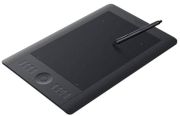
Abbildung ggf. abweichend
Preisalarm
Wacom Intuos5 M
Hersteller: Wacom
Abbildung ggf. abweichend
Hersteller: Wacom
- Grafiktablett
- Druckstufen: 2.048
- Aktive Fläche: B 224 cm - H 140 cm
- Maus: Nein
- Zubehör: Stift, USB-Kabel
- Maße: B380 mm x H251 mm x T12 mm
- Gewicht: 970 g
Hersteller:
Wacom
Tests und Testberichte

Test: Einzeltest: Wacom Intuos5
Zitat: The good: + The Intuos5 is sturdy and unassuming - just what you want from a tool for another purpose. It’s easy to set up too, with a DVD installation disc and some quick steps to follow. Once you’re done, you can get started. This is a very different experience to drawing on a regular joe iPad or Android tablet: the 8.8x5.5-inch screen and pen are incredibly pressure sensitive (capable of registering 2048 different levels), so newcomers might find the experience strange, from filling in specific pixels to something more akin to paper. Just as it would naturally using a pen, pencil or paintbrush, the strokes created using the Wacom pen vary in width and opacity (depending on the settings) in relation to the amount of pressure applied when moving it across the surface of the tablet. The Wacom Intuos 5 is a truly fantastic product when it comes to customizing to suit your individual needs. The express keys can be used to create one-click keyboard shortcuts so you can largely eliminate the keyboard. These buttons can be customized for general computer use, or for individual programmes, such as Adobe Photoshop or Illustrator, which can really save a lot of time as a project develops. The multi-touch features add further customization options, meaning you can easily cover all your basic keyboard shortcuts, controlling the majority of your work with the pen, express buttons or fingertips. For example a two finger touch could bring up a settings menu, or a five finger swipe might save your work… the choices are all yours, fitting perfectly around the way you like to work and the programmes. If you’re an artist, it’s a familiar movement, like switching between paintbrush and fingertip or between charcoal stick and a smudging finger.
The bad: - Wacom is the big daddy in drawing tablets for a reason. That said, its skills command a high price, and the medium sized Intuos5 we tested still hovers around the £270 mark, several months after launch. That’s a lot for a drawing tool, and if you think you’re a more fair-weather digital doodler, you might want to consider one of several Android devices that incorporate some of Wacom’s tech, like the Samsung Galaxy Note 2 or Note 10.1 tablet. If you’re getting an upgrade soon anyway, you’ll get much of the same tech at effectively no extra cost, even if it isn’t quite so sensitive.
The Wacom Intuos 5’s a charming tablet for serious digital artists, with few to no drawbacks. But unless you’re planning on getting into it in a big way, the £270 pricetag is far too steep for the option of sprucing up just the odd image.

Test: Einzeltest: Wacom Intuos5 Tablet: An Essential Image-Editing Tool, Updated
Zitat: The Intuos5 line is available in several sizes, from small, with an active area of 6.2x3.9”, up to large, with a 12.8x8” active area. For photography, I find the medium size ideal. This gives me an 8.8x5.5” active area.
At $349 (medium size), the Intuos5 is a considerable investment. But, it will last forever, and you’ll find yourself getting more done in less time than you ever thought possible. With the addition of touch functionality, the tablet is an even better value than before, useful any time you’re in front of the computer—not just for graphic editing.
For more information, visit Wacom’s website at: www.wacom.com .

Test: Einzeltest: Wacom Intuos5 series
Zitat: With its ergonomic design that is equally useful for left- or right-handed users, the new slim-profile Wacom Intuos5 allows creative professionals to work in a comfortable and intuitive way. New features include multi-touch gesture support, wireless capabilities and the Express View display to help users remember their application-specific ExpressKey settings. Just briefly resting a finger on any of the keys reveals the settings on-screen, a display that fades within a few seconds. The Intuos5 tablets can be converted to a wireless tablet by installing the optional Wireless Accessory kit, thus eliminating the need to keep the tablet physically connected to the computer.

Test: Einzeltest: Wacom Intuos5 tekentablet
Zitat: De Wacom Intuos5 is een behoorlijke verbetering op zijn voorganger. Het tablet ziet er beter uit, voelt en werkt prettiger en de multi-touch functionaliteit is echt een nuttige aanvulling waardoor ook voor twijfelaars de muis snel de deur uit kan. Heb je nog een Intuos4 waar je tevreden over bent dan is een overstap minder vanzelfsprekend. Op een Apple computer heb je wel al direct meerwaarde bij multi-touch, maar voor Windows gebruikers is het nog even op Windows 8 wachten voordat multi-touch ook hier veel toegevoegde waarde zal bieden (je kunt het al uitproberen met Windows 8 Beta, alle touch functies worden wel reeds door het tablet standaard ondersteund). Hoe dan ook is de Intuos5 een erg mooi tekentablet waar je als fotograaf prima mee uit de voeten moet kunnen. Hoewel nog niet per direct gaat dit tekentablet ook mijn Intuos4 zeker vervangen. Persoonlijk raad ik voor fotografen het M(edium) formaat aan met touch functionaliteit. Is deze je nog iets te prijzig overweeg dan zeker ook de Wacom Bamboo Pen & Touch.

Test: Einzeltest: Wacom Intuos5
Zitat: The Wacom Intuos5 line is available in several sizes, from small, with an active area of 6.2"x3.9" up to large with a 12.8"x8" active area. For photography, I find the medium to be the ideal size to work with. This gives me an 8.8"x5.5" active area. Bundled with the Intuos5 are links to download Photoshop Elements 10, Anime Studio Debut, SketchBook Express, Nik Color Efex Pro 4 Select Edition, and a 90 day trial of Corel Painter 12. At $349, the medium Intuos5 is a considerable investment, but they last forever, and you´ll find yourself getting more done in less time than you ever thought possible. With the addition of touch functionality, the Wacom Intuos5 tablets are even better value than before, useful at any time you´re in front of the computer - not just in graphic editing.
Beliebte Produkte

Wacom One Small
ab 69,90€

Wacom Intuos Pro S
ab 249,00€

Wacom DTK-1660E
ab 499,00€

Wacom Cintiq 22 (DTK2260K0A)
ab 1.035,73€

Wacom One Medium
ab 66,23€

XP-Pen Artist Pro 22 (Gen 2)
ab 659,00€

Moleskine Smart Writing Set
ab 199,99€

Huion Kamvas 13
ab 187,85€

XP-Pen Artist Pro 16 Gen 2
ab 449,57€

Huion Kamvas Pro 16
ab 282,00€
Produktdaten
| Maße: | B380 mm x H251 mm x T12 mm |
|---|---|
| Gewicht: | 970 g |
| Maus: | Nein |
|---|---|
| Zubehör: | Stift, USB-Kabel |
| Druckstufen: | 2.048 |
|---|---|
| Aktive Fläche: | B 224 cm - H 140 cm |
Wacom Intuos5 M Bewertungen

Sei der Erste, der dieses Produkt bewertet! Deine Erfahrung kann anderen Nutzern bei ihrer
Tests und Testberichte Wacom Intuos5 M
The Gadget Show
Ausgabe 5/2013
Test: Einzeltest: Wacom Intuos5
Zitat: "The good: + The Intuos5 is sturdy and unassuming - just what you want from a tool for another purpose. It’s easy to set up too, with a DVD installation disc and some quick steps to follow. Once you’re done, ..."
shutterbug.com
Ausgabe 11/2012
Test: Einzeltest: Wacom Intuos5 Tablet: An Essential Image-Editing Tool, Updated
Zitat: "The Intuos5 line is available in several sizes, from small, with an active area of 6.2x3.9”, up to large, with a 12.8x8” active area. For photography, I find the medium size ideal. This gives me an 8.8x5.5” active area.
At $349 (medium size), the Intuos5 is a considerable investment. But, it will last forever, and you’ll ..."
TIPA - Technical Image Press Association Germany
Ausgabe 8/2012
Test: Einzeltest: Wacom Intuos5 series
Zitat: "With its ergonomic design that is equally useful for left- or right-handed users, the new slim-profile Wacom Intuos5 allows creative professionals to work in a comfortable and intuitive way. New features include multi-touch gesture support, wireless capabilities and the Express View display to help users remember their applic..."
photofacts.nl
Ausgabe 4/2012
Test: Einzeltest: Wacom Intuos5 tekentablet
Zitat: "De Wacom Intuos5 is een behoorlijke verbetering op zijn voorganger. Het tablet ziet er beter uit, voelt en werkt prettiger en de multi-touch functionaliteit is echt een nuttige aanvulling waardoor ook voor twijfelaars de muis snel de deur uit kan. Heb je nog een Intuos4 waar je tevreden over bent dan is een overstap minder va..."
photographyblog.com
Ausgabe 10/2011
Test: Einzeltest: Wacom Intuos5
Zitat: "The Wacom Intuos5 line is available in several sizes, from small, with an active area of 6.2"x3.9" up to large with a 12.8"x8" active area. For photography, I find the medium to be the ideal size to work wit..."
Beliebte Kaufberatungen
- Gute Grafiktabletts für Designer ab 30 Euro im Vergleich28.10.2021
- Tastaturen bis 50 Euro im Vergleich – vielseitige Modelle für Arbeit und Freizeit24.11.2025

- High-End-Tastaturen für Profis und Gamer im Vergleich07.03.2023
- Beliebte schnurlose Tastaturen ab 30 Euro im Vergleich13.02.2023

- Beliebte Tastaturen zwischen 100 und 150 Euro im Vergleich08.02.2023
- Beliebte Tastaturen zwischen 50 und 100 Euro im Vergleich07.02.2023
- Beliebte Tastaturen mit Kabel unter 30 Euro im Vergleich01.02.2023
- Präzise, schnell, stylisch: Die besten kabelgebundenen Gaming-Mäuse im Vergleich28.01.2022
- Zocken bis der Arzt kommt: Die besten drahtlosen Mäuse für Gamer28.01.2022
- Drahtlos und schnell: Die besten Wireless-Mäuse für jeden Einsatzzweck28.01.2022
Beliebte Produkte



* Die Preise und Versandkosten können sich seit der letzten Aktualisierung beim jeweiligen Händler verändert haben. Alle Preise sind Angaben des jeweiligen Anbieters inklusive Umsatzsteuer, zzgl. Versand - alle Angaben ohne Gewähr. Unser Angebot umfasst nur Anbieter, die für Ihre Weiterleitung an den Shop eine Klick-Provision an uns zahlen.
* Die Preise und Versandkosten können sich seit der letzten Aktualisierung beim jeweiligen Händler verändert haben. Alle Preise sind Angaben des jeweiligen Anbieters inklusive Umsatzsteuer, zzgl. Versand - alle Angaben ohne Gewähr. Unser Angebot umfasst nur Anbieter, die für Ihre Weiterleitung an den Shop eine Klick-Provision an uns zahlen.


©1999- 2026 by guenstiger.de
Zu teuer?
Jetzt Preisalarm setzen!
Jetzt Preisalarm setzen!
Preisalarm
Wacom Intuos5 M bewerten

Das hat leider nicht funktioniert!
Die Seite konnte nicht aufgerufen werden, bitte versuchen Sie es später nochmal.

Formular schließen?
