
Für dieses Produkt haben wir gegenwärtig keine Händlerangebote in der Datenbank.
in allen Kategorien
in Computer
in Telekommunikation
in Hifi | Audio
in TV | Video | Foto
in Haushalt
in Freizeit
in Mode & Accessoires
in Haus & Garten
in Beauty & Gesundheit
in Auto & Motorrad
- ComputerArbeitsspeicherBauteileCPUDruckerDruckerzubehörEingabegerätFestplatteGrafikkarteKomplettsystemLaufwerkMainboardMonitorMultimediaNetzwerkNotebookNotebookzubehörPC-SpielScannerSoftwareSpeichermediumSpielekonsoleTablet & E-Book-ReaderTaschenrechnerComputer und Zubehör verschiedenster Anbieter findenJetzt shoppen
- TelekommunikationFaxgerätFunkgerätHandyHandyzubehörTelefon (Analog)Telefon (ISDN)Telefon (VoIP)TelefonanlageTelefone, Smartphones und Co. verschiedenster Anbieter findenJetzt shoppen

- Hifi | AudioAudio-KompaktanlageDJ EquipmentHifi-BausteinInstrumentenzubehörKopfhörerLautsprecherMusikinstrumentPortable AudioplayerRadioHiFi- und Audiogeräte verschiedenster Anbieter findenJetzt shoppen
- TV | Video | FotoBeamer + ZubehörBlu-ray-/DVD-GerätCamcorderFernseherFoto-/CamcorderzubehörFotokameraHome Cinema SystemObjektivOptikTV-ReceiverTV-ZubehörTV/Sat-AntenneTV-, Video- und Fotoapparate verschiedenster Anbieter findenJetzt shoppen
- HaushaltBaby-HomeBaby-MobilBack- & GrillgerätBügeleisenDunstabzugshaubeGefrierschrankGeschirrGeschirrspülerHeiz- & KlimagerätHerdKaffeemaschineKüchenhelferKühlschrankMikrowelleNähmaschinePersonenwaageReinigungsgerätStaubsaugerWaschmaschineWäschetrocknerHaushaltsgeräte verschiedenster Anbieter findenJetzt shoppen
- FreizeitBuchCamping + OutdoorFahrradFilme & SerienFitnessgerätModellbauSpiele + PuzzleSpielwarenSportSportschuheWintersportFreizeitartikel verschiedenster Anbieter findenJetzt shoppen

- Mode & AccessoiresMode DamenMode HerrenMode KinderMode-AccessoiresSchmuckSchuheTasche + KofferUhrKleidung, Schuhe & Accessoires verschiedenster Anbieter findenJetzt shoppen

- Haus & GartenBaumarktBürobedarfGartenHeimwerkerMöbelSonstigesTierbedarfWeihnachtenGarten- und Heimwerkerartikel verschiedenster Anbieter findenJetzt shoppen

- Beauty & GesundheitArzneimittelElektrische ZahnbürsteElektrorasiererGesundheitsproduktHaarstylerKontaktlinsenKosmetikWellnessGesundheitsprodukte und Kosmetik verschiedenster Anbieter findenJetzt shoppen

- Auto & MotorradAutoreifen + FelgeAutozubehörCar HifiMotorradNavigationssystemAuto- und Motorradzubehör verschiedenster Anbieter findenJetzt shoppen
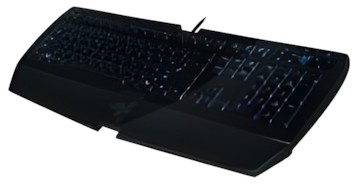
Abbildung ggf. abweichend
Razer Lycosa Mirror
Hersteller: Razer
Abbildung ggf. abweichend
Hersteller: RazerPreisalarm
- Tastatur mit Hintergrundbeleuchtung
- Tastaturanschluss: USB
- Tastaturlayout: QWERTZ
- USB-HUB: Ja
- Systemvoraussetzung: Windows XP / Vista
- Handballenauflage: Ja
- Maße: B470 mm x H20 mm x T222 cm
Hersteller:
Razer
Tests und Testberichte

Test: Einzeltest: Razer Lycosa Mirror - Review
Zitat: Pros: + solide Verarbeitung
+ angenehmer Anschlag
+ zahlreiche Features (Anti-Ghosting, Hyperesponse...)
+ viele Sondertasten
+ starke Hintergrundbeleuchtung
+ fairer Preis
+ coole Optik
Cons: - Hochglanzoberfläche

Test: Einzeltest: Razer Lycosa Mirror Special Edition Gaming Keyboard
Zitat: Seal of Approval
Typing on the Lycosa Mirror certainly takes some getting used to. Because the keys each have such a low rise above the frame of the keyboard, it´s unnaturally hard to tell the difference between keys without looking. The left control key takes especially long to get used to, as the Window keys are not as pronounced as on other keyboards. Though the Lycosa Mirror at first gives the impression of a laptop keyboard, the keys do take a bit of force to press, and make their fair share of clicking noise when pressed. The wrist rest on the Lycosa Mirror is especially sturdy because it is screwed down, which is a nice change from other keyboards. The notch cut out from the center, however, is unexplainable and frankly annoying. It sits right under the right-hand palm, providing uneven support. As far as looks are concerned, the Lycosa Mirror is a very attractive keyboard. The mirror finish is of course prone to finger prints. Even though Razer provided a cleaning cloth, in order to keep the keyboard looking nice, you´ll have to clean regularly. While I like the idea of a mirror-finished peripheral, there aren´t many shiny mice on the market, so the Lycosa Mirror may not match your setup. Also, the WASD light-up mode doesn´t make much sense. If you have to look for keys, you´re going to have to look for more than just those four keys; nobody just uses W, A, S and D. I do appreciate, though, that Razer didn´t attempt to light up the space-bar. The media “TouchPanel” is a nice feature, but it is a pretty shabby solution that Razer included four media players and only four media players. If you like Songbird or any other media player, you´re likely out of luck. Where the Lycosa Mirror really excels is its customizability. Changing key functions is very easy and straightforward, and the ten profiles available provide a good amount of room for variation. Playing MMOs on the Lycosa Mirror, like Guild Wars, makes binding keys easier than ever. Speaking of which, gaming on the Lycosa Mirror is a pleasure, as keys push quickly and the layout is standard. In all, the Razer Lycosa Mirror is a great keyboard to use. It looks good and functions well. Razer did make some curious design choices, such as the notch in the wrist rest, the WASD lighting modes and the lonely USB port, but the Lycosa Mirror is a fine product nevertheless.

Test: Einzeltest: Razer Lycosa Mirror
Zitat: Bronze Award
Positive Aspekte: + Aussehen der Mirror Special Edition
+ Guter Druckpunkt der Tasten
+ Gute Ausleuchtung der Tasten
+ Headsetund USB-Anschlüsse
Negative Aspekte: - Minimales Klappern der Leertaste beim Loslassen
- Keine zusätzlichen GamingTasten
Die Razer Lycosa Mirror bescherte uns ein ungetrübtes Gaming-Vergnügen und ließ auch bei der Erstellung von Texten keine Wünsche offen. Fehlerfreies und schnelles Tippen waren das Ergebnis. Eine marginale Trübung des Eindrucks hinterlassen das minimale Klappern der Leertaste beim Loslassen und die fehlenden, gesonderten Gaming-Tasten. Man kann zwar die herkömmlichen Tasten mit neuen Einzelbelegungen und Makros versehen, aber einige wenige Zusatztasten wären wünschenswert gewesen. Die wahlweise Beleuchtung des gesamten Tastenfeldes oder der WASD-Gaming-Kombination ermöglicht das sichere Ansteuern der Tasten ohne Kompromisse. Dunkle Gamer-Räume erschweren einem nun nicht mehr den Erfolg bei wetteifernden Herausforderungen, denen man sich stellt. Die rückwärtigen Anschlüsse der Tastatur sind äußerst komfortabel beim Anschluß von Headset und bis zu zwei USB-Geräten. Besonders bei Geräten mit zu kurzen Kabeln kommen diese einem sehr entgegen. Das elegante Mirror-Finishing erfordert auch ein wenig Liebe vom Benutzer. Dazu dient das authentische Razer-Microfasertuch mit Razer-Stickerei, welches die Spuren der letzten Anstrengungen eines Wettbewerbs im Handumdrehen wegwischt. Für einen Listenpreis von rund 70 Euro muss man allerdings genug Gamer-Enthusiast sein, um diesem Schmuckstück den nötigen Respekt zu zollen.

Test: Einzeltest: Razer Lycosa Mirror Keyboard
Zitat: Pros: + Backlighting
+ Customizability
+ Looks
+ Simple driver control software
Cons: - Key labels not visible till backlit
- No control over backlight brightness
This keyboard, like most other Razer products, is meant to be used by gamers and the company´s great experience in that market really shows. The Lycosa has a nice array of useful features that should be appreciated by this crowd. The first thing anyone opening this box will notice is the mirror-like, glossy look of both the keyboard´s casing and keys. The only downside is that it´s hard to keep it clean as the tiniest dust particle will be clearly visible. However, and surprisingly enough, fingerprints aren´t so much of an issue as they barely show up and a quick wipe using the supplied cloth will clean those few obvious marks in a second. While the sound ports aren´t a ground breaking feature, I can see them widely used by people whose sound system consist of a pair of headphones and a microphone. Gamers are likely to correspond to that profile, especially those playing online games and commonly attending LAN events. In the same area, the USB port is also an interesting addition and, since it works at full USB 2.0 speed, it can be used with any device. Getting started was a straightforward process, the supplied disc automatically launched the installer and the Lycosa was ready to be used in no time. Razer´s driver control allowed for a great deal of customization, was very easy to use and is a lightweight application. I would have appreciated more control over the backlighting, including dimming and more options as to which keys should be lit. It´s also worth mentioning once again that the keys are barely visible when they´re off no matter how well lit your room is. Fortunately, once it´s backlight is turned on, everything is as clear as it gets and typing on it is a pleasure. The keys feel great and the keyboard is comfortable to type on even after many hours spent using it. That made for a great gaming experience as well as the low profile keys that cut response time enough to make a difference in some situations. Overall, the Lycosa Mirror Special Edition is a great keyboard with a bunch of interesting features at a competitive price point. Of course, don´t hesitate to make a trip to a local store since there is nothing like trying it out for yourself. If you´re into gaming and looking for a brand new keyboard, this one is definitely worth looking at.

Test: Einzeltest: Razer Lycosa Mirror Keyboard
Zitat: Seal of approval
Pros:
+ 1000MHz Poll and 1ms Response
+ Great back lighting
+ 10 profiles for macro switching
+ All keys macro programmable
+ Multimedia touch buttons
+ Looks intimidating
+ On keyboard USB and sound ports
Cons:
- One USB port
- Finger Prints show up harshly
- Multimedia keys only compatible with certain programs
- In WASD mode in darkened room other keys hard to see
Meinungen
Beliebte Produkte

Razer Tartarus Pro Keypad
ab 142,87€

Razer BlackWidow V4 75%
ab 164,74€

Razer Huntsman Mini
ab 65,30€

Razer BlackWidow V3
ab 99,99€

NZXT Function 2
ab 59,99€

Cherry KC 6000 Slim
ab 34,89€

Corsair K100 RGB OPX
ab 269,99€

Elgato Stream Deck+ XL
ab 349,00€

Cherry MX 10.0N RGB
ab 69,90€
Produktdaten
| Maße: | B470 mm x H20 mm x T222 cm |
|---|
| Tastaturanschluss: | USB |
|---|---|
| Tastaturlayout: | QWERTZ |
| USB-HUB: | Ja |
| Systemvoraussetzung: | Windows XP / Vista |
| Handballenauflage: | Ja |
11 Meinungen**
Neueste
perfekt
|
15.08.2019
|
von Trustami
top
Softwarefehler
|
10.01.2019
|
von Trustami
Tastatur hat sich immer wieder aufgehangen
Razer - geplante Obsoleszenz in vielen Produkten!
|
03.09.2017
|
von Trustami
In kurz: Die Tastatur bleibt täglich stecken, wodurch manche Tasten spontan nicht mehr verwendet werden können bzw. als permanente Eingabe vom Computer erfasst werden, wogegen nur ein Neustart des Computers oder eine Trennung des USB-Steckers hilft. Dies hat aufgrund des Multimedia-Panels auch oft zur Folge, dass der Windows-Media-Player permanent geöffnet wird und nur geschlossen werden kann, wenn man die Verbindung zur Tastatur...mehr trennt.
Weiters geht der Lack bei den Tasten nach 1-2 Jahren Verwendung ab. Auf meiner 'Gaming-Tastatur' kann man die Tasten WASD nicht mehr erkennen.
Im Detail: Habe diese Tastatur sowohl für mein Büro als auch Privat gekauft und ärgere mich noch heute über jedes von mir erworbene Razer-Produkt. Wie auch bereits bei drei vierschiedenen Computer-Mäusen festgestellt tauchen bei allen Razer-Produkten recht schnell immer die selben versteckten Mängel auf, die nach Durchsicht von diversen Kommentaren bei allen Produkten scheinbar gleich sind und selbst bei eindeutigem Vorhandensein in neueren Versionen dieser Artikel erneut auftauchen. Beide unabhängig von einander verwendet und unterschiedlich oft genutzten Tastaturen weisen den oben erwähnten Fehler auf. Nie wieder Razer! Überteuert und wohl bewusst und absichtlich mit Fehlern verkauft!weniger
Miserable Verarbeitung am Touchpad
|
23.04.2017
|
von Trustami
Die Tastatur hätte von mir eine gute Bewertung bekommen wenn da nicht ein Problem wäre: Das Touchpad. Dieses hatte einen Wackelkontakt so dass es ab und zu dazu kam dass es alle anderen Eingaben überschrieb und alle Tasten gleichzeitig drückte. Sehr nervig und kaum zu beheben. Einzige Lösung war, die Tastatur neu anzuschließenFür Spiele nur bedingt geeignet.
sehr gute tastertur
|
24.11.2016
|
von Trustami
ich weiß nicht was ich sagen soll ausser das ich sehr zufrieden bin und das ich eine klare kauf Empfehlung geben kann
Absolute minderwertig, sehr entteuschend.
|
31.05.2016
|
von Trustami
Ich benutze diese Tastatur nun seit mehreren Monaten und ärgere mich täglich über dieses schlechte Produkt.
Optisch entteuschend. Kunsttofftasten mit eigenartig rutschiger Glanzbeschichtung wirken sehr billig.
Das schlimmste sind die Tastenanschläge, man kann Tasten gedrückt halten ohne dass dies erkannt wird.
Die rechte Shift-Taste sowie die Return-Taste wackeln und verkanten wenn man nicht genau mittig drückt.
Der Klinkenstecker für den...mehr Kopfhöreranschluss ist bereits ausgeleiert und hat nun Kontaktprobleme.
Solch eine madige Qualität kennt man eigentlich nur von billigen chinesischen Fälschungen, wirklich schlimm, Finger weg!weniger
TRAUM Tastatur
|
31.05.2016
|
von Trustami
Habe die Tastatur vor ca.6Jahren gekauft.
Habe sie ca. 5-8 Stunden pro Tag im Gebrauch gehabt. Jetzt fängt langsam an die matte Schicht abzukürzen. Aber für diese lange Zeit ist das super!
Ich würde mir die Tastatur jetzt sofort noch mal kaufen, wenn es möglich wäre.
Ich finde leider keine Tastatur die ich auch nur annähernd so Hammer finde.
Leider ein teures Experiment
|
09.06.2014
|
von Trustami
Ich hatte diese Tastatur für einige Zeit im Einsatz. Optisch bieten Beleuchtung und Klarlack einiges, aber man merkt schnell die Anfälligkeit für Schmutz und Fettabdrücke.
Das größte Problem und absolutes No-Go in dieser Preisklasse sind jedoch die Treiber-/Firmware-Probleme mit dem Gerät. Ich hatte hier wirklich sehr oft Situationen in denen sich die Tastatur einfach aufhängt. Dann half nur Steckerziehen und hoffen, dass es nicht gleich wieder...mehr passiert.
Da ich die Zuverlässigkeit für eine Gaming Tastatur extrem wichtig finde, kann ich das Produkt leider nicht weiterempfehlen. Für den Preis und mit dem Razer-Hintergrund hätte ich mir deutlich mehr versprochen. Leider sein Geld nicht wert gewesen...weniger
Tastatur sieht gut aus, funktionierte auch gut, bis
|
02.02.2014
|
von Trustami
dann auf einmal, beim drücken einer Taste ein Buchstabe mehrmals getippt wurde aus unbekannten Gründen! Man will zum Beispiel ein "e" schreiben und auf dem Bildschirm erscheint "eeeeeee"...
Dreck...
|
20.10.2013
|
von Trustami
Viel zu empfindlicher Klavierlack, Touch Elemente fangen nach 1-2 Jahren an zu Spinnen. Lieder springen einfach weiter, Filme spulen vor... Schön anzusehen, aber das war's auch schon.... Treiber wurden neu aufgelegt, System ebenfalls und dennoch spinnt das Touch-Element.
Zurück
Weiter
Razer Lycosa Mirror Gesamte Bewertungen
2.5out of 5
Basierend auf 11 Nutzer-Meinungen
Teile uns deine Meinung zum Produkt mit!
Tests und Testberichte Razer Lycosa Mirror
gamer-network.com
Ausgabe 3/2009
Test: Einzeltest: Razer Lycosa Mirror - Review
Zitat: "Pros: + solide Verarbeitung
+ angenehmer Anschlag
+ zahlreiche Features (Anti-Ghosting, Hyperesponse...)
+ viele Sondertasten
+ starke Hintergrundbeleuchtung
+ fairer Preis
+ coole Optik
Cons: - Hochg..."
ocia.net
Ausgabe 3/2009
Test: Einzeltest: Razer Lycosa Mirror Special Edition Gaming Keyboard
Zitat: "Seal of Approval
Typing on the Lycosa Mirror certainly takes some getting used to. Because the keys each have such a low rise above the frame of the keyboard, it´s unnaturally hard to tell the difference between keys without looking. The left control key takes especially long to get used to, as the Window keys are not as pro..."
3dfusion.de
Ausgabe 3/2009
Test: Einzeltest: Razer Lycosa Mirror
Zitat: "Bronze Award
Positive Aspekte: + Aussehen der Mirror Special Edition
+ Guter Druckpunkt der Tasten
+ Gute Ausleuchtung der Tasten
+ Headsetund USB-Anschlüsse
Negative Aspekte: - Minimales Klappern der..."
overclockersclub.com
Ausgabe 1/2009
Test: Einzeltest: Razer Lycosa Mirror Keyboard
Zitat: "Pros: + Backlighting
+ Customizability
+ Looks
+ Simple driver control software
Cons: - Key labels not visible till backlit
- No control over backlight brightness
This keyboard, like most o..."
bjorn3d.com
Ausgabe 12/2008
Test: Einzeltest: Razer Lycosa Mirror Keyboard
Zitat: "Seal of approval
Pros:
+ 1000MHz Poll and 1ms Response
+ Great back lighting
+ 10 profiles for macro switching
+ All keys macro programmable
+ Multimedia touch buttons
+ Looks intimid..."
Beliebte Kaufberatungen
- Tastaturen bis 50 Euro im Vergleich – vielseitige Modelle für Arbeit und Freizeit24.11.2025

- High-End-Tastaturen für Profis und Gamer im Vergleich07.03.2023
- Beliebte Tastaturen zwischen 100 und 150 Euro im Vergleich08.02.2023

- Beliebte Tastaturen zwischen 50 und 100 Euro im Vergleich07.02.2023
- Beliebte Tastaturen mit Kabel unter 30 Euro im Vergleich01.02.2023
- Beliebte schnurlose Tastaturen ab 30 Euro im Vergleich13.02.2023
- Präzise, schnell, stylisch: Die besten kabelgebundenen Gaming-Mäuse im Vergleich28.01.2022
- Zocken bis der Arzt kommt: Die besten drahtlosen Mäuse für Gamer28.01.2022
- Drahtlos und schnell: Die besten Wireless-Mäuse für jeden Einsatzzweck28.01.2022
- Für PC und Mac: Die besten kabelgebundenen Computermäuse im Vergleich11.01.2022
Beliebte Produkte


* Die Preise und Versandkosten können sich seit der letzten Aktualisierung beim jeweiligen Händler verändert haben. Alle Preise sind Angaben des jeweiligen Anbieters inklusive Umsatzsteuer, zzgl. Versand - alle Angaben ohne Gewähr. Unser Angebot umfasst nur Anbieter, die für Ihre Weiterleitung an den Shop eine Klick-Provision an uns zahlen.
** Es ist uns nicht möglich zu prüfen, ob die veröffentlichten Bewertungen von Verbrauchern stammen, die die Produkte tatsächlich verwendet oder erworben haben.
** Es ist uns nicht möglich zu prüfen, ob die veröffentlichten Bewertungen von Verbrauchern stammen, die die Produkte tatsächlich verwendet oder erworben haben.
* Die Preise und Versandkosten können sich seit der letzten Aktualisierung beim jeweiligen Händler verändert haben. Alle Preise sind Angaben des jeweiligen Anbieters inklusive Umsatzsteuer, zzgl. Versand - alle Angaben ohne Gewähr. Unser Angebot umfasst nur Anbieter, die für Ihre Weiterleitung an den Shop eine Klick-Provision an uns zahlen.
** Es ist uns nicht möglich zu prüfen, ob die veröffentlichten Bewertungen von Verbrauchern stammen, die die Produkte tatsächlich verwendet oder erworben haben.
** Es ist uns nicht möglich zu prüfen, ob die veröffentlichten Bewertungen von Verbrauchern stammen, die die Produkte tatsächlich verwendet oder erworben haben.


©1999- 2026 by guenstiger.de
Zu teuer?
Jetzt Preisalarm setzen!
Jetzt Preisalarm setzen!
Preisalarm
Razer Lycosa Mirror bewerten

Das hat leider nicht funktioniert!
Die Seite konnte nicht aufgerufen werden, bitte versuchen Sie es später nochmal.

Formular schließen?
