

Für dieses Produkt haben wir gegenwärtig keine Händlerangebote in der Datenbank.
in allen Kategorien
in Computer
in Telekommunikation
in Hifi | Audio
in TV | Video | Foto
in Haushalt
in Freizeit
in Mode & Accessoires
in Haus & Garten
in Beauty & Gesundheit
in Auto & Motorrad
- ComputerArbeitsspeicherBauteileCPUDruckerDruckerzubehörEingabegerätFestplatteGrafikkarteKomplettsystemLaufwerkMainboardMonitorMultimediaNetzwerkNotebookNotebookzubehörPC-SpielScannerSoftwareSpeichermediumSpielekonsoleTablet & E-Book-ReaderTaschenrechnerComputer und Zubehör verschiedenster Anbieter findenJetzt shoppen

- TelekommunikationFaxgerätFunkgerätHandyHandyzubehörTelefon (Analog)Telefon (ISDN)Telefon (VoIP)TelefonanlageTelefone, Smartphones und Co. verschiedenster Anbieter findenJetzt shoppen

- Hifi | AudioAudio-KompaktanlageDJ EquipmentHifi-BausteinInstrumentenzubehörKopfhörerLautsprecherMusikinstrumentPortable AudioplayerRadioHiFi- und Audiogeräte verschiedenster Anbieter findenJetzt shoppen
- TV | Video | FotoBeamer + ZubehörBlu-ray-/DVD-GerätCamcorderFernseherFoto-/CamcorderzubehörFotokameraHome Cinema SystemObjektivOptikTV-ReceiverTV-ZubehörTV/Sat-AntenneTV-, Video- und Fotoapparate verschiedenster Anbieter findenJetzt shoppen

- HaushaltBaby-HomeBaby-MobilBack- & GrillgerätBügeleisenDunstabzugshaubeGefrierschrankGeschirrGeschirrspülerHeiz- & KlimagerätHerdKaffeemaschineKüchenhelferKühlschrankMikrowelleNähmaschinePersonenwaageReinigungsgerätStaubsaugerWaschmaschineWäschetrocknerHaushaltsgeräte verschiedenster Anbieter findenJetzt shoppen

- FreizeitBuchCamping + OutdoorFahrradFilme & SerienFitnessgerätModellbauSpiele + PuzzleSpielwarenSportSportschuheWintersportFreizeitartikel verschiedenster Anbieter findenJetzt shoppen

- Mode & AccessoiresMode DamenMode HerrenMode KinderMode-AccessoiresSchmuckSchuheTasche + KofferUhrKleidung, Schuhe & Accessoires verschiedenster Anbieter findenJetzt shoppen

- Haus & GartenBaumarktBürobedarfGartenHeimwerkerMöbelSonstigesTierbedarfWeihnachtenGarten- und Heimwerkerartikel verschiedenster Anbieter findenJetzt shoppen

- Beauty & GesundheitArzneimittelElektrische ZahnbürsteElektrorasiererGesundheitsproduktHaarstylerKontaktlinsenKosmetikWellnessGesundheitsprodukte und Kosmetik verschiedenster Anbieter findenJetzt shoppen

- Auto & MotorradAutoreifen + FelgeAutozubehörCar HifiMotorradNavigationssystemAuto- und Motorradzubehör verschiedenster Anbieter findenJetzt shoppen
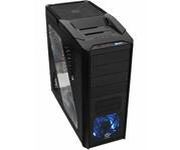
Abbildung ggf. abweichend
Preisalarm
ThermalTake V9 BlacX
Hersteller: Thermaltake
Abbildung ggf. abweichend
Hersteller: Thermaltake
- Gehäuse
- Formfaktor: ATX, MicroATX
- Laufwerkseinschübe: 1x extern 3,5 Zoll, 4x extern 5,25 Zoll, 1x intern 2,5 Zoll, 4x intern 3,5 Zoll
- USB 2.0-Anschlüsse: 2x
- Anschlüsse: Audio-Ausgang (3,5 mm), Audio-Eingang (3,5 mm), Kopfhörer, Mikrofon, Netzstecker, USB 2.0
- Anzahl der Lüfter: 1
- Sichtfenster: Ja
- Display vorhanden: Nein
Hersteller:
Thermaltake
Tests und Testberichte

Test: Einzeltest: Thermaltake V9 BlacX
Zitat: Pro: + dobry stosunek ceny do jakości
+ solidne spasowanie elementów
+ możliwość montażu długich kart graficznych
+ filtry przeciwpyłowe na frontowym i dolnym panelu
+ stacja dokująca Hot Swap
+ dobre warunki przewietrzania
+ ciche wentylatory
Contra: - twarde nóżki
- górna zatoka 5.25-cala zajęta przez okablowanie stacji dokującej
- brak filtrów przeciwpyłowych w bocznych pokrywach
Być może model V9 BlacX Editions nie jest produktem idealnym, to jednak wart jest zainteresowania dla osób poszukujących przewiewnej i cichej obudowy. Jej 230 milimetrowy wentylator (800 RPM / 14 dBA szumów), umieszczony na górze jest niemal niesłyszalny, a zapewnia naprawdę spora wymianę powietrza w jej wnętrzu. Nieco bardziej słyszalne są frontowy i tylny wentylator 120mm, ale jak na moje ucho, kręcąc się z prędkością około 1000 RPM (producent obiecuje nam 16 dBA hałasu), są całkiem ciche.
Całość obudowy wygląda na prawdę dobrze i tylko niektórym nie będzie podobał się podświetlany diodami LED frontowy wentylator (nie ma niestety możliwości wyłączenia podświetlenia). Głównym magnesem przyciągającym klientów ma być jednak dwumiejscowa stacja dokująca dla dysków z interfejsem SATA, która dzięki technologii Hot Swap, pozwoli podłączać nam nasze i znajomych dyski bez konieczności restartowania komputera.
Plusem na pewno jest możliwość montażu (i to beznarzędziowego), długich kart graficznych, jak choćby dwurdzeniowy Radeon HD 5970.
Co do minusów tej konstrukcji, to paradoksalnie jej dobra przewiewność może być źródłem sporego zapylenia w naszym komputerze, bo dodatkowe otwory w bocznych pokrywach nie otrzymały już filtrów przeciwpyłowych. Konstruktorzy zwrócili głównie uwagę na zapewnienie dość wysokiej sztywności obudowy, co przełożyło się na trwałe zespolenie tacy płyty głównej ze stojakiem na napędy optyczne i dyski. Skutkiem tego zabrakło nieco miejsca na wygodne prowadzenie okablowania, choć wystarczyłoby wyciąć ze dwa, trzy otwory wzdłuż prawego boku tacy, umożliwiając w ten sposób poprowadzenie wiązek kabli bezpośrednio, w okolice gniazd zasilania płyty czy portów SATA. Niby szczegół, ale jeśli ktoś już raz spróbuje tego "dobrodziejstwa", to z pewnością będzie mu tego brakować w V9.
Za firmową obudowę z podwójna stacją dokującą, oknem bocznym i bardzo dobrą jakością wykonania oraz materiałów, przyjdzie nam zapłacić niecałe 400 PLN (na przykład 378.48 PLN w pccom.pl), choć ostatni spadek wartości złotówki względem dolara i euro, nie bardzo sprzyja atrakcyjnym cenom sprzętu komputerowego i nie tylko. Mimo wszystko uważam, że Thermaltake V9 BlacX jest godne odznaczenia Best Buy za dobry stosunek jakości i oferowanych możliwości do jej ceny.

Test: Einzeltest: Thermaltake V9 BlacX Mid-Tower Case
Zitat: Pro: + External hard drive docking bays
+ Space for heatsink installation after motherboard mounting
+ Tool-less design
+ Quiet
+ Dust filters on all intake fans including the power supply
+ Large, top mounted exhaust fan
+ Quality build, nothing feels cheap
+ USB 3.0 port
+ Supports long graphics cards
Contra: - No user manual
- Lacks cable management
- Blue LED fan and power light don’t match red & black of the interior
- Faster fans would increase cooling performance
- No SSD mounting supplies included
In the end, the Thermaltake V9 BlacX case is a strong addition to the market. It looks great, it’s quiet, and it’s unique. The big thing Thermaltake needs to fix with this case is cable management, which is almost non-existent, but other than that it’s a strong case and a product we recommend.

Test: Einzeltest: Thermaltake V9 BlacX Edition
Zitat: The drive caddies are useful for quickly installing graphics cards, but the V9 BlacX needs refining in other areas.

Test: Einzeltest: Thermaltake V9 BlacX Edition Mid Tower Chassis
Zitat: When it is all said and done, I can now see why the V9 BlacX Edition chassis got the accolades that it did. The design and feature set that Thermaltake provides covers almost any component you would need to install. While internally I did complain about the lack of support for SSDs, it isn´t all that hard to just set one into the Dock, but let´s think logically for a moment. Who in their right mind is going to want to let a $200 plus investment sit in the top of their case, ripe for the plucking? That along with the small issue I ran into with the expansion card locks, are the only things I can really beat up the V9 BlacX for in any respect.

Test: Einzeltest: Thermaltake V9 BlacX
Zitat: Pros: + Quiet operation
+ Unique styling
+ Only case with a dual-bay docking station
+ USB 3.0 support
+ Tool-less operation
Cons: - Poor wire management options
- Low speed fans negatively affect temperatures
My thoughts of the Thermaltake V9 BlacX lie in the realm of indifference. The case looks good on the outside, the dual bay docking station is neat, and the window is just the right size. The paint job is done well and everything is covered evenly. I like the tool less features, and the CPU retention bracket opening is in the right spot, too. There is nothing more frustrating when going to install a CPU cooler and finding that the motherboard tray is blocking access to one hole! However, I do find that there only being room for three fans a little bit of a let-down, though this really does keep the noise down. Keeping the noise down also causes suffering from the total amount of airflow through the case, which negatively affects hardware temperatures.
The wire management accommodations in the V9 BlacX are seriously lacking and can use some improvement. There is very little room behind the motherboard tray to run wires, and nothing to really route them around. I really did my best on the wire management here, and I´m not terribly happy with the results. I did also find that the power supply mounting bracket does not allow for the power supply to be flipped over, allowing for a slight advantage with wire management since the cables can start closer to the motherboard tray.
Overall, the case looks good and has the built-in docking stations which can be very useful for some folks. It isn´t really the best looking case I´ve used, but aesthetically it´s got some points that may appeal to others. The front USB 3.0 support is a good thing to have, but manufacturers still seem to be running these cables out through water cooling grommets! Since motherboards don´t typically have USB 3.0 headers on them, case manufacturers must run the USB cable to the external port on the back of the motherboard. However, I´ve only seen manufacturers run these cables through a water cooling grommet. I´d like to see what users do when they want to run USB3.0 and have an external water cooling loop at the same time. In conclusion, if you´re picky on wire management like I consider myself to be, there are cases out there with much better wire management for around the same price. Otherwise, it´s not a bad buy for those who like the Thermaltake style, like tool less features, want a window, and have a use for the built-in, dual-bay docking station.
Beliebte Produkte

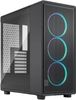
Thermaltake Core W200
ab 500,90€

Thermaltake The Tower 600
ab 133,11€

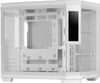
Thermaltake Ceres 500 TG ARGB Black
ab 79,46€

Thermaltake View 600 TG
ab 114,98€

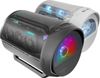
Mars Gaming MC-CYLON
ab 128,54€

Mars Gaming MC-3TCORELCD
ab 109,90€

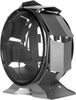
Mars Gaming MCORB Circular Tower
ab 119,90€

Mars Gaming MC-EDGE
ab 89,90€
Produktdaten
| Display vorhanden: | Nein |
|---|---|
| Touchscreen: | Nein |
| Maße: | B19 cm x T47,50 cm x H43 cm |
|---|---|
| Gewicht: | 4,50 kg |
| Formfaktor: | ATX, MicroATX |
|---|---|
| Laufwerkseinschübe: | 1x extern 3,5 Zoll, 4x extern 5,25 Zoll, 1x intern 2,5 Zoll, 4x intern 3,5 Zoll |
| USB 2.0-Anschlüsse: | 2x |
| Anschlüsse: | Audio-Ausgang (3,5 mm), Audio-Eingang (3,5 mm), Kopfhörer, Mikrofon, Netzstecker, USB 2.0 |
| Anzahl der Lüfter: | 1 |
| Sichtfenster: | Ja |
ThermalTake V9 BlacX Bewertungen

Sei der Erste, der dieses Produkt bewertet! Deine Erfahrung kann anderen Nutzern bei ihrer
Tests und Testberichte ThermalTake V9 BlacX
in4.pl
Ausgabe 9/2011
Test: Einzeltest: Thermaltake V9 BlacX
Zitat: "Pro: + dobry stosunek ceny do jakości
+ solidne spasowanie elementów
+ możliwość montażu długich kart graficznych
+ filtry przeciwpyłowe na frontowym i dolnym panelu
+ stacja dokująca Hot Swap
+ dobre warunki przewietrzania
+ ciche wentylatory
Contra: - twarde nóżki
- górna zatoka 5.25-cala zajęta przez okablowanie st..."
bjorn3d.com
Ausgabe 4/2011
Test: Einzeltest: Thermaltake V9 BlacX Mid-Tower Case
Zitat: "Pro: + External hard drive docking bays
+ Space for heatsink installation after motherboard mounting
+ Tool-less design
+ Quiet
+ Dust filters on all intake fans including the power supply
+ Large, top ..."
expertreviews.co.uk
Ausgabe 4/2011
Test: Einzeltest: Thermaltake V9 BlacX Edition
Zitat: "The drive caddies are useful for quickly installing graphics cards, but the V9 BlacX needs refining in other areas."
Tweaktown
Ausgabe 3/2011
Test: Einzeltest: Thermaltake V9 BlacX Edition Mid Tower Chassis
Zitat: "When it is all said and done, I can now see why the V9 BlacX Edition chassis got the accolades that it did. The design and feature set that Thermaltake provides covers almost any component you would need to ..."
overclockersclub.com
Ausgabe 3/2011
Test: Einzeltest: Thermaltake V9 BlacX
Zitat: "Pros: + Quiet operation
+ Unique styling
+ Only case with a dual-bay docking station
+ USB 3.0 support
+ Tool-less operation
Cons: - Poor wire management options
- Low speed fans negatively affect te..."

overclockingstation.de
27.10.2010
Test: Einzeltest: Thermaltake V9 BlacX Edition
Zitat: "Positiv: + Dual-Bay-Dockingstation für Festplatten
+ Durchgehend schwarzer Innenraum
+ Window im Seitenteil
+ Staubfilter für Frontlüfter und Netzteil
+ Window im Seitenteil
Negativ: - Lüfter kombini..."

Gamezoom.net
Ausgabe 9/2010
Test: Einzeltest: Thermaltake V9 BlacX Gehäuse
Zitat: "Pro: gute Verarbeitung
+ ausreichend Stauraum
+ Schnellmontage
+ ausgezeichneter Airflow
+ geringe Lautstärke
+ bemerkenswerte Ausstattung
+ hübsche Optik
+ geringes Gewicht
Contra: USB
- Anschluss..."

techzine.nl
Ausgabe 8/2010
Test: Einzeltest: Thermaltake V9 BlacX Edition
Zitat: "Pluspunten: + Uiterlijk
+ Degelijke bouwkwaliteit
+ Mogelijkheid tot het installeren van grote CPU-koelers en lange grafische kaarten
+ USB 3.0-aansluiting aan de voorkant
+ Dual Bay Docking Station.
Minpunten: - Geen eSATAaansluiting aanwezig aan de bovenkant
- USB 3.0kabel een doorn in het oog wanneer deze gebruikt ..."
Beliebte Kaufberatungen
- Beliebte Desktop-PC-Gehäuse im Vergleich21.03.2023

- Beliebte Mini-Tower PC-Gehäuse im Vergleich20.03.2023

- Beliebte Big Tower PC-Gehäuse im Vergleich14.03.2023
- Beliebte PC-Gehäuse für Midi-Tower im Vergleich28.02.2023
- Beliebte PC-Gehäuse für ITX- und DTX-Mainboards im Vergleich28.02.2023
- Beliebte externe Gehäuse für M.2-SSDs im Vergleich20.01.2025
- Beliebte ATX-Netzteile mit 750 Watt im Vergleich29.10.2024
- Beliebte Gehäuselüfter mit RGB im Vergleich03.07.2023
- Beliebte Gehäuselüfter mit 140 mm Durchmesser im Vergleich01.07.2023
- Beliebte Gehäuselüfter mit 120 mm Durchmesser im Vergleich01.07.2023
Beliebte Produkte

* Die Preise und Versandkosten können sich seit der letzten Aktualisierung beim jeweiligen Händler verändert haben. Alle Preise sind Angaben des jeweiligen Anbieters inklusive Umsatzsteuer, zzgl. Versand - alle Angaben ohne Gewähr. Unser Angebot umfasst nur Anbieter, die für Ihre Weiterleitung an den Shop eine Klick-Provision an uns zahlen.
* Die Preise und Versandkosten können sich seit der letzten Aktualisierung beim jeweiligen Händler verändert haben. Alle Preise sind Angaben des jeweiligen Anbieters inklusive Umsatzsteuer, zzgl. Versand - alle Angaben ohne Gewähr. Unser Angebot umfasst nur Anbieter, die für Ihre Weiterleitung an den Shop eine Klick-Provision an uns zahlen.


©1999- 2026 by guenstiger.de
Zu teuer?
Jetzt Preisalarm setzen!
Jetzt Preisalarm setzen!
Preisalarm
ThermalTake V9 BlacX bewerten

Das hat leider nicht funktioniert!
Die Seite konnte nicht aufgerufen werden, bitte versuchen Sie es später nochmal.

Formular schließen?
