Für dieses Produkt haben wir gegenwärtig keine Händlerangebote in der Datenbank.
in allen Kategorien
in Computer
in Telekommunikation
in Hifi | Audio
in TV | Video | Foto
in Haushalt
in Freizeit
in Mode & Accessoires
in Haus & Garten
in Beauty & Gesundheit
in Auto & Motorrad
- ComputerArbeitsspeicherBauteileCPUDruckerDruckerzubehörEingabegerätFestplatteGrafikkarteKomplettsystemLaufwerkMainboardMonitorMultimediaNetzwerkNotebookNotebookzubehörPC-SpielScannerSoftwareSpeichermediumSpielekonsoleTablet & E-Book-ReaderTaschenrechnerComputer und Zubehör verschiedenster Anbieter findenJetzt shoppen
- TelekommunikationFaxgerätFunkgerätHandyHandyzubehörTelefon (Analog)Telefon (ISDN)Telefon (VoIP)TelefonanlageTelefone, Smartphones und Co. verschiedenster Anbieter findenJetzt shoppen

- Hifi | AudioAudio-KompaktanlageDJ EquipmentHifi-BausteinInstrumentenzubehörKopfhörerLautsprecherMusikinstrumentPortable AudioplayerRadioHiFi- und Audiogeräte verschiedenster Anbieter findenJetzt shoppen
- TV | Video | FotoBeamer + ZubehörBlu-ray-/DVD-GerätCamcorderFernseherFoto-/CamcorderzubehörFotokameraHome Cinema SystemObjektivOptikTV-ReceiverTV-ZubehörTV/Sat-AntenneTV-, Video- und Fotoapparate verschiedenster Anbieter findenJetzt shoppen
- HaushaltBaby-HomeBaby-MobilBack- & GrillgerätBügeleisenDunstabzugshaubeGefrierschrankGeschirrGeschirrspülerHeiz- & KlimagerätHerdKaffeemaschineKüchenhelferKühlschrankMikrowelleNähmaschinePersonenwaageReinigungsgerätStaubsaugerWaschmaschineWäschetrocknerHaushaltsgeräte verschiedenster Anbieter findenJetzt shoppen
- FreizeitBuchCamping + OutdoorFahrradFilme & SerienFitnessgerätModellbauSpiele + PuzzleSpielwarenSportSportschuheWintersportFreizeitartikel verschiedenster Anbieter findenJetzt shoppen

- Mode & AccessoiresMode DamenMode HerrenMode KinderMode-AccessoiresSchmuckSchuheTasche + KofferUhrKleidung, Schuhe & Accessoires verschiedenster Anbieter findenJetzt shoppen

- Haus & GartenBaumarktBürobedarfGartenHeimwerkerMöbelSonstigesTierbedarfWeihnachtenGarten- und Heimwerkerartikel verschiedenster Anbieter findenJetzt shoppen

- Beauty & GesundheitArzneimittelElektrische ZahnbürsteElektrorasiererGesundheitsproduktHaarstylerKontaktlinsenKosmetikWellnessGesundheitsprodukte und Kosmetik verschiedenster Anbieter findenJetzt shoppen
- Auto & MotorradAutoreifen + FelgeAutozubehörCar HifiMotorradNavigationssystemAuto- und Motorradzubehör verschiedenster Anbieter findenJetzt shoppen
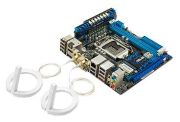
Abbildung ggf. abweichend
Preisalarm
ASUS P8Z77-I Deluxe
Hersteller: ASUS
Abbildung ggf. abweichend
Hersteller: ASUS
- Mainboard
- Sockel: 1155
- Speichertyp: DDR3
- Anschlüsse: DVI-I, eSATA, HDMI-Eingang, PS/2, S/PDIF optisch, USB 2.0, USB 3.0, WLAN, Gigabit Ethernet RJ45 (1000 Mbit)
- Formfaktor: Mini-ITX
- Anzahl DIMM: 2
- Speichertaktung: 1.600 MHz
- Grafikkarte OnBoard: Ja
Hersteller:
ASUS
Tests und Testberichte

Test: Einzeltest: Asus P8Z77-I Deluxe
Zitat: + Gute Komponentenauswahl
+ Gutes Layout für ein Mini-ITX-Board
+ Lässt sich gut für seine Größe übertakten
+ Extrem niedriger Stromverbrauch trotz guter Ausstattung
+ "AI Suite II" mit vielfältigen Optionen unter Windows
+ kompletter Lieferumfang mit WLAN- und Bluetooth-Antennen
- Platzprobleme (durch VCore-Karte und evtl. bei zu hohen Speicherkits)
- Relativ hoher Preis

Test: Test: Mini-ITX-Boards
Zitat: + Sehr gutes UEFI-Menü
+ WLAN n und Bluetooth
- Hoher Preis
Test: Liebling, ich habe den PC geschrumpft
Zitat: + Sehr gutes UEFI mit tollen OC-Optionen
+ WLAN und Bluetooth
+ Vorbildliches Platinen-Layout

Test: Einzeltest: ASUS P8Z77-I Deluxe
Zitat: + Umfangreiche Ausstattung
+ Sockel Position Mittig
+ Platz für große CPU Kühler
+ Z77 Chip
+ Gute OC Eigenschaften
+ Einfaches Handling
+ WiFi und Bluetooth
- Relativ teuer
- Nur 2 Lüfter Anschlüsse
Test: Einzeltest: Asus P8Z77-I Deluxe
Zitat: ASUS liefert mit dem P8Z77-I Deluxe ein kompaktes Leistungswunder, dass kaum negative Kritik zulässt. Die Leistung und Overclocking-Möglichkeiten sind für einen solchen Zwerg beachtlich, die Ausstattung kann sich selbst mit den großen Mainboards messen. An dieser Stelle schmerzt nur der Preis. Gute 170 Euro für ein Mainboard mit nur einem PCI Express Steckplatz? Für einen kleinen Gaming-PC noch ausreichend, wird es beim HTPC mit hochwertiger Soundkarte oder TV-Karten schon schwierig.
Daneben gibt es für den kleinen Rechner mit langen Laufzeiten noch eine zweite Schwachstelle mit finanziellen Implikationen: die Leistungsaufnahme. MSI braucht mit dem ATX-Board Z77A-GD55 glatte 15 Watt weniger im Leerlauf - diese Differenz summiert sich schnell auf.
Meinungen
Produktdetails
Grafik-Chip: Intel HD Graphics
LAN-Chip: Intel 82579V
LAN-Geschwindigkeit: 10 Mbit (IEEE 802.3), 100 Mbit (IEEE 802.3u), 1000 Mbit (IEEE 802.3ab)
RAID Kompatibilität: RAID 0, RAID 1, RAID 10, RAID 5
Beliebte Produkte

ASUS Prime B860M-K
ab 111,00€

ASUS ROG Strix B760-F Gaming WiFi
ab 207,98€

ASUS Prime H610I-Plus D4-CSM
ab 109,00€

ASUS Prime H610M-A D4-CSM
ab 70,00€

ASUS ROG Strix B760-I Gaming WiFi
ab 173,00€

NZXT N7 Z790
ab 202,83€

GIGABYTE B760 Gaming X GEN5
ab 99,00€

MSI B760 Gaming Plus WiFi DDR4
ab 133,80€

MSI MEG Z890 Ace
ab 620,16€

GIGABYTE Z890 Gaming X WIFI7
ab 211,36€
Produktdaten
| RAID Kompatibilität: | RAID 0, RAID 1, RAID 10, RAID 5 |
|---|---|
| Anschlüsse: | DVI-I, eSATA, HDMI-Eingang, PS/2, S/PDIF optisch, USB 2.0, USB 3.0, WLAN, Gigabit Ethernet RJ45 (1000 Mbit) |
| Schnittstellen: | Gigabit Ethernet (1000 Mbit), S-ATA II (300 MB/s), S-ATA III (600 MB/s), USB 2.0, USB 3.0 |
| PCI-Express-Schnittstellen: | 1x PCI Express 3.0 x1 |
| Formfaktor: | Mini-ITX |
|---|---|
| Maße: | B17 cm x T17 cm |
| Sockel: | 1155 |
|---|
| Anzahl DIMM: | 2 |
|---|---|
| Speichertyp: | DDR3 |
| Speichertaktung: | 1.600 MHz |
| Grafikkarte OnBoard: | Ja |
|---|---|
| Grafik-Chip: | Intel HD Graphics |
| LAN-Chip: | Intel 82579V |
| LAN-Geschwindigkeit: | 10 Mbit (IEEE 802.3), 100 Mbit (IEEE 802.3u), 1000 Mbit (IEEE 802.3ab) |
4 Meinungen**
Neueste
alles O.K.
|
08.05.2014
|
von Trustami
deutsche Anleitung, gute Ausstattung, schön klein für mein Mobil-PC! Zwei inSata-Anschlüsse mehr, wären super gewesen aber man kann nicht alles haben !!
Perfektes Preis/Leistungsverhältnis
|
18.07.2013
|
von Trustami
Betreibe es mit:-Xilence SFX Series Netzteil (Lüfter (80 mm) SATA, 250 Watt)-16GB-Kit G.Skill TridentX PC3-19200U CL10-OCZ VTX4-25SAT3-256G Vertex4 256GB interne SSD (6,4cm (2,5 Zoll), SATA III)-Thermaltake Element Q Midi-Tower PC-Gehäuse ITX mit Netzteil 200 Watt schwarz/rot-Intel Core i7-3770K Prozessor (3,5GHz, L3 Cache, Sockel 1155)- ohne extra GrafikkarteWindows 8 Start inkl. Benutzer Anmeldung nach Bios piepsen zirka 4-5 Sekunden.Verwende...mehr es als Multimedia PC, aber auch Spiele sind auf Grafik Einstellung Mittel, ohne Ruckeln zu spielen.Noch zu empfehlen: geschlossene Wasserkühlung, da bei größeren Rechenleistungen (Video Konvertierung CS6) doch der CPU schnell auf 70Grad aufwärts geht und dann hört man den PC.weniger
So far so good.
|
23.11.2012
|
von Trustami
Works perfectly out of the box.Note that you need to connect keyboard / mouse - and some "sensitive" hardware (iPod) to the mainboard USB connector at the rear - not to the extension USB connectors.Download the drivers from the ASUS website - not from the included CD. And update the BIOS from the website too.Not sure why you need the Bluetooth / WLAN, but I just wanted the small form factor.No complaints until now.
Sehr gutes und kompaktes Mainboard
|
19.05.2012
|
von Trustami
Ich habe das Mainboard schon seit einiger Zeit im Betrieb und muss sagen, dass es den großen Mainboards in nichts nachsteht. Das Bios/UEFI ist genau so umfangreich und dank des Z77-Chipsatzes sind auch Ausflüge in höhere Taktregionen ohne Probleme möglich. So sind DDR3-2200 oder 5GHz mit einer Intel K-CPU kein Problem.Dazu kommt noch der relativ niedrige Verbrauch (es verbraucht aber mehr als das Zotac Z77-ITX WiFi) und die vielen...mehr Onboard-Features (WLan, Bluetooth, USB 3.0, etc.).Wer einen kleinen PC aufbauen will, der zum zocken und zum übertakten geeignet sein soll, der sollte das P8Z77-I Deluxe auf jeden Fall näher betrachten. Einziger Wermutstropfen - der hohe Preis.weniger
ASUS P8Z77-I Deluxe Gesamte Bewertungen
5.0out of 5
Basierend auf 4 Nutzer-Meinungen
Teile uns deine Meinung zum Produkt mit!
Tests und Testberichte ASUS P8Z77-I Deluxe
Hardwareluxx
Ausgabe 5/2013
Test: Einzeltest: Asus P8Z77-I Deluxe
Zitat: "+ Gute Komponentenauswahl
+ Gutes Layout für ein Mini-ITX-Board
+ Lässt sich gut für seine Größe übertakten
+ Extrem niedriger Stromverbrauch trotz guter Ausstattung
+ "AI Suite II" mit vielfältigen Optionen unter Windows
+ kompletter Lieferumfang mit WLAN- und Bluetooth-Antennen
- Platzprobleme (durch VCore-Karte und..."
PC games Hardware
Ausgabe 2/2013
Test: Test: Mini-ITX-Boards
Zitat: "+ Sehr gutes UEFI-Menü
+ WLAN n und Bluetooth
- Hoher Preis"
PC games Hardware
Ausgabe 9/2012
Test: Liebling, ich habe den PC geschrumpft
Zitat: "+ Sehr gutes UEFI mit tollen OC-Optionen
+ WLAN und Bluetooth
+ Vorbildliches Platinen-Layout"
hartware.net
Ausgabe 8/2012
Test: Einzeltest: ASUS P8Z77-I Deluxe
Zitat: "+ Umfangreiche Ausstattung
+ Sockel Position Mittig
+ Platz für große CPU Kühler
+ Z77 Chip
+ Gute OC Eigenschaften
+ Einfaches Handling
+ WiFi und Bluetooth
- Relativ teuer
- Nur 2 Lüfter Anschlüsse"
hartware.net
Ausgabe 5/2012
Test: Einzeltest: Asus P8Z77-I Deluxe
Zitat: "ASUS liefert mit dem P8Z77-I Deluxe ein kompaktes Leistungswunder, dass kaum negative Kritik zulässt. Die Leistung und Overclocking-Möglichkeiten sind für einen solchen Zwerg beachtlich, die Ausstattung kann sich selbst mit den großen Mainboards messen. An dieser Stelle schmerzt nur der Preis. Gute 170 Euro für ein Mainboard ..."
Beliebte Kaufberatungen
- Beliebte B660-Mainboards im Vergleich: So ist der PC auf einer guter Basis07.08.2023

- Beliebte Mainboards mit B760-Sockel im Vergleich25.07.2023
- Beliebte Mainboards für Intel-1200-Sockel im Vergleich24.02.2023
- Beliebte Mainboards für Intel Sockel 1700 im Vergleich23.02.2023
- Beliebt und richtig schnell: X670E-Mainboards im Vergleich – das "E" steht für Extreme13.08.2024

- Mainboard-Kaufberatung für AM5 Sockel: Die beliebtesten Motherboards im Vergleich14.12.2023
- Beliebte Mainboards mit B650E-Sockel im Vergleich25.07.2023
- Preis-Leistungs-Tipp: A620-Mainboards im Vergleich24.07.2023
- Beliebte AMD-Mainboards mit AM4-Sockel im Vergleich16.02.2023
- AMD Mainboards im Vergleich: Die beliebtesten Modelle für jeden PC13.05.2022
Beliebte Produkte


* Die Preise und Versandkosten können sich seit der letzten Aktualisierung beim jeweiligen Händler verändert haben. Alle Preise sind Angaben des jeweiligen Anbieters inklusive Umsatzsteuer, zzgl. Versand - alle Angaben ohne Gewähr. Unser Angebot umfasst nur Anbieter, die für Ihre Weiterleitung an den Shop eine Klick-Provision an uns zahlen.
** Es ist uns nicht möglich zu prüfen, ob die veröffentlichten Bewertungen von Verbrauchern stammen, die die Produkte tatsächlich verwendet oder erworben haben.
** Es ist uns nicht möglich zu prüfen, ob die veröffentlichten Bewertungen von Verbrauchern stammen, die die Produkte tatsächlich verwendet oder erworben haben.
* Die Preise und Versandkosten können sich seit der letzten Aktualisierung beim jeweiligen Händler verändert haben. Alle Preise sind Angaben des jeweiligen Anbieters inklusive Umsatzsteuer, zzgl. Versand - alle Angaben ohne Gewähr. Unser Angebot umfasst nur Anbieter, die für Ihre Weiterleitung an den Shop eine Klick-Provision an uns zahlen.
** Es ist uns nicht möglich zu prüfen, ob die veröffentlichten Bewertungen von Verbrauchern stammen, die die Produkte tatsächlich verwendet oder erworben haben.
** Es ist uns nicht möglich zu prüfen, ob die veröffentlichten Bewertungen von Verbrauchern stammen, die die Produkte tatsächlich verwendet oder erworben haben.


©1999- 2026 by guenstiger.de
Zu teuer?
Jetzt Preisalarm setzen!
Jetzt Preisalarm setzen!
Preisalarm
ASUS P8Z77-I Deluxe bewerten

Das hat leider nicht funktioniert!
Die Seite konnte nicht aufgerufen werden, bitte versuchen Sie es später nochmal.

Formular schließen?
